User’s Manual ScanWave ● J05451 ● V5 ● (13) ● 05/2013 ● NG39EN020E ● 9
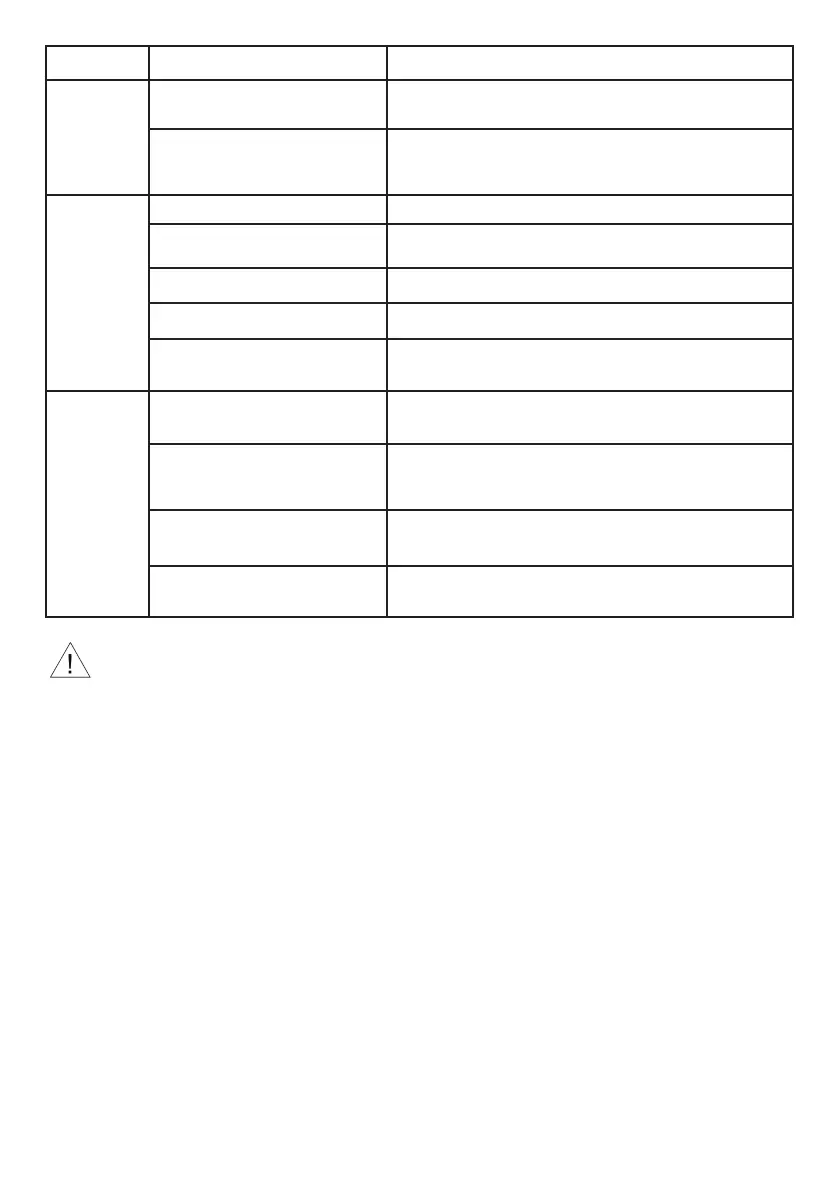
Symptom Possible causes Solutions
Laser defect
or no light
power
Defective laser diode or defective
buttons
Return to SATELEC after-sales department
Light guide defective and / or
dirty
Clean light guide and / or return to SATELEC after-sales
department
Charger does
not operate
AC power wall outlet defective Contact your electrician
AC power adapter defective Return to SATELEC after-sales department
Light and audible alarms defective Return to SATELEC after-sales department
Fuse defective Return to SATELEC after-sales department
Wrong battery detection Clean battery contacts and charger and / or return to
SATELEC after-sales department
Dysfunction
of power
level
verification
Light guide defective and / or
dirty
Clean light guide and / or return to SATELEC after-sales
department
LED defective and / or dirty Check cleanliness of verification window and / or return to
SATELEC after-sales department
Indicator light defective Check cleanliness of LEDs, clean with dry air jet and / or
return to SATELEC after-sales department
Window defective and / or dirty Clean window
It is particularly recommended to continuously wear protective glasses during repair operations.


 To Next Page