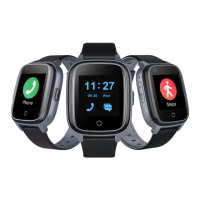
Need help?
Do you have a question about the SaveFamily ENJOY and is the answer not in the manual?
Key details on battery, water resistance, SIM card, warranty, and environmental cautions.
Make video calls, manage contacts, and use the telephone dialer.
Send messages, capture photos, and view saved content.
Configure device settings, alarms, and access tools like calculator.
Access games and play music stored on the device.
Customize watch dial, volume, and screen brightness.
Set the date, time, sleep time, and select the desired language.
Manage USB mode and switch the device on/off.
Utilize chat, security zones, location tracking, and app settings.
Manage whitelist, remote camera, health data, and class mode.
Configure alarms, receive alerts, and track achievements.
Configure SOS numbers, sound guardian, and SMS alerts.
Schedule location updates and select time zones.
Manage language, switch settings, timer, watch finder, and remote operations.
Guidance on watch registration, internet connectivity, and battery life.
Access YouTube tutorials and contact information for support.
 General
| Brand | SaveFamily |
|---|---|
| Model | ENJOY |
| Category | Watch |
| Language | English |

 To Next Page