4
11
22
11
22
䧜┖䧜Ꚅ♓篾兠䣴䬞ն
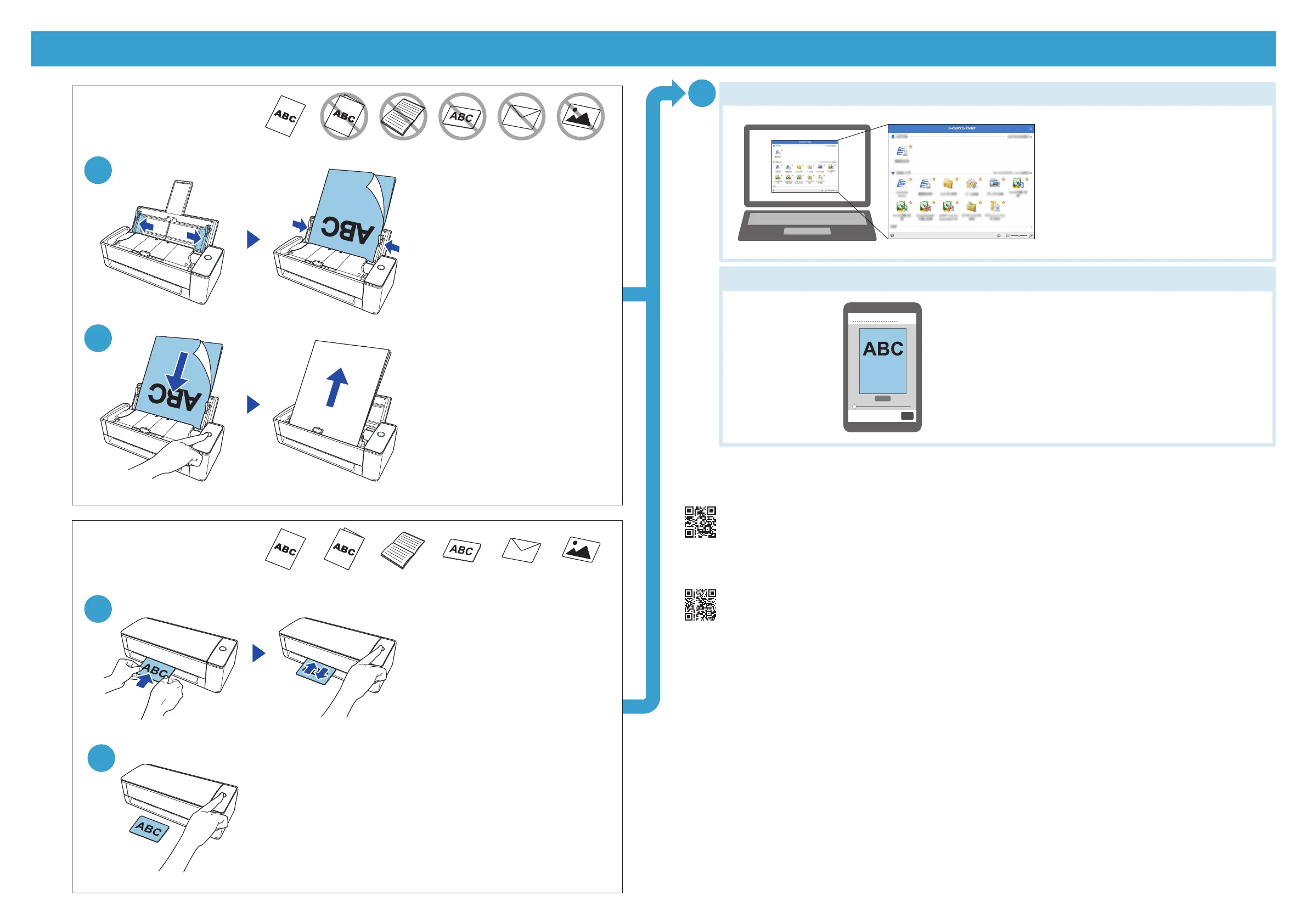
Press the button to finish the scan.
䷑⪌乃勮ն
Load a document.
䧜┖䧜Ꚅն
Press the button.
䷑⪌乃勮䇛䧜┖䧜Ꚅն
Insert a document and press the button.
33
6㑔鲽篣䣴䬞
鲭篣䣴䬞
僃㛻╙
A4
䡝
Legal
㛻㵸 㵒䤼氳
A3
㛻㵸
㵸⫊㯸 ⶮ撴 ⟓㵟 拨撴
僃㛻╙
A4
䡝
Legal
㛻㵸 㵒䤼氳
A3
㛻㵸
㵸⫊㯸 ⶮ撴 ⟓㵟 拨撴
https://scansnap.com/gs/
僗⪨㏇
Windows®
*
/Mac
*
╈✳榫
ScanSnap Home
⽰
ScanSnap Manager
休氳陣篱阻糋塟끈陴⹆ꠢ♓┖
URL
ն
For details about the setup procedure when you use ScanSnap Home and ScanSnap Manager on Windows® (*)/Mac (*), refer to the URL.
https://scansnap.fujitsu.com/g-support/en/
催㛡⟓䕛陴⹆ꠢ⺨熨䧗䡝
ScanSnap
䶹䧏粟珆ն
For further information, refer to the manuals or ScanSnap Support Site.
Windows
Ⓡ
(*)/Mac(*)
iOS(*)/Android™(*)
.pdf
YYYYMMDDhhmm
㎂⥼㰆⤴㏇阻㚷┕ն
An image is saved to the device.
☲䒍鵭蘦╈鴲䦫㰆⤴泘氳㏐璡㎂剝ն
Select an icon, such as a save destination, from
the Quick Menu.
Ⓒ PFU Limited 2021-2023
*:♓┖⺲燡╙⺨⪜氳◲⿁⺲燡䡝よ剝ն
The following names are the product names or trademarks of their respective companies.
Windows、Mac、iOS、Android
Regulatory Model : P3805A


 To Previous Page