Scantronic
12V
0V
A
B
LED
0V
12V
OP
A
B
ADDR 4
ADDR 3
ADDR 2
BRIGHT
TERM
D1
D0
0V
12V
Z1
Z2
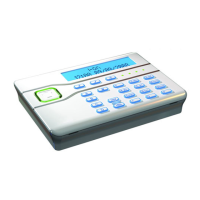
KEY-K01/KEY-KP01/KEY-KPZ01
UK
Installation Instructions
FR
Guide d’installation
NL
Installatiehandleiding
Figure 1. Key usage / Abb. 1. Verwendung der Tasten / Figure 1. Fonction des touches / Figura 1. Uso dei tasti / Afbeelding 1. Toetsgebruik
1
Programmable keys / Programmierbare Tasten / Touches programmables / Tasti programmabili / Programmeerbare toetsen
Hold-up keys / Überfalltasten / Touches Agression / Tasti allarme panico / Overval-toetsen
LCD display / LCD-Display / Afficheur LCD / Display LCD / LCD-scherm
Programming keys / Programmiertasten / Touches de programmation / Tasti di programmazione / Programmeertoetsen
Navigation key / Navigationstaste / Touche de navigation / Tasto di navigazione / Navigatietoets
Unset key / Deaktivierungstaste / Touche de désarmement / Tasto disinserimento / Uitschakeltoets
Figure 2. Removing the cover
Abb. 2. Die Abdeckung entfernen
Figure 2. Dépose du couvercle
Figura 2. Rimozione del coperchio
Afbeelding 2. Deksel verwijderen
Cable-entry holes (also on each side) / Öffnungen für Kabeleingang (auch an jeder Seite) / Trous de
passage de câble (de chaque côté) / Fori di ingresso cavi (anche su ciascun lato) / Kabelopening
(ook aan weerskanten)
Use the supplied 3mm x 19mm (No4) screw for the tamper block.
Verwenden Sie die im Lieferumfang enthaltene Schraube (3 mm x 19 mm,
Nr. 4) für den Sabotageblock.
Utilisez la vis 3 mm x 19 mm (No4) fournie pour le bloc d’autoprotection.
Utilizzare la vite di 3 mm x 19 mm (N. 4) in dotazione per il blocco
antimanomissione.
Gebruik de meegeleverde 3 mm x 19 mm (Nr. 4) schroef als
sabotage-beveiliging.
Minimum 3 off 4mm x 25mm (No8) countersunk screws
Verwenden Sie mindestens drei Senkkopfschrauben (4mm x 25mm, Nr.8)
Au moins 3 vis à tête fraisée 4mm x 25mm (No 8)
Minimo 3 viti svasate di 4 mm x 25 mm (N. 8)
Minimaal 3 van 4 mm x 25 mm (Nr. 8) verzonken schroeven
Figure 3. Mounting the backplate / Abb. 3. Die Rückplatte montieren / Figure 3. Montage de la plaque
arrière / Figura 3. Montaggio della piastra posteriore / Afbeelding 3. Grondplaat monteren
DE
Installationsanweisungen
IT
Istruzioni per l’installazione
Figure 4. Keypad PCB / Abb. Keypad-Leiterplatte / Figure 4. Carte électronique du clavier (PCB) / Figura 4. PCB tastiera /
Afbeelding 4. Printplaat toetsenbord
This product must be installed and maintained only by qualified service personnel. /
Dieses Produkt darf nur von qualifiziertem Servicepersonal installiert und gewartet werden. /
Ce produit doit être installé et entretenu par un technicien qualifié. /
Questo prodotto deve essere installato e sottoposto a manutenzione solo da personale di servizio qualificato. /
Dit product moet steeds door gekwalificeerde vakmensen worden geïnstalleerd en onderhouden.
Bus
Bus device / Busgerät / Dispositif de
bus / Dispositivo bus / Busapparaat
Open-collector output (KEY-KPZ01 only) / Open-Kollektor-
Ausgang (nur KEY-KPZ01) / Sortie à collecteur ouvert
(KEY-KPZ01 uniquement) / Uscita open-collector (solo
KEY-KPZ01) / Open-collector uitgang (alleen KEY-KPZ01)
Address links / Adressverbindungen /
Cavaliers d’adressage / Collegamenti indirizzi /
Adresverbindingen
Brightness/ Helligkeit / Luminosité /
Luminosità / Helderheid
RS485 termination / RS485-Abschluss / Raccordement
RS485 / Terminazione RS485 / RS485-afsluiting
Volume / Lautstärke /
Volume / Volume / Volume
Blue/Blau/Bleu/Blu/Blauw
White/Weiß/Blanc/Bianco/Wit
Green/Grün/Vert/Verde/Groen
Red/Rot/Rouge/Rosso/Rood
Black/Schwarz/Noir/Nero/Zwart
KEY-EP (KEY-KP01 and KEY-KPZ01 only) /
KEY-EP (nur KEY-KP01 und KEY-KPZ01) /
KEY-EP (KEY-KP01 et KEY-KPZ01 uniquement) /
KEY-EP (solo KEY-KP01 e KEY-KPZ01) /
KEY-EP (alleen KEY-KP01 en KEY-KPZ01)
Zones 1-2 (KEY-KPZ01 only) /
Zonen 1-2 (nur KEY-KPZ01) /
Zones 1-2 (KEY-KPZ01 uniquement) /
Zone 1-2 (solo KEY-KPZ01) /
Zones 1-2 (alleen KEY-KPZ01)

 Need help?
 General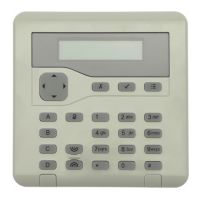

 To Next Page