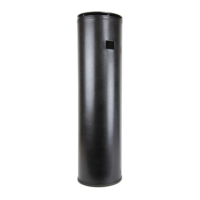
The ScentAir Whisper HOME is a fragrance diffuser designed to create a memorable scent experience in residential spaces. It offers various control options, including manual operation, Bluetooth connectivity via a smartphone app, and Wi-Fi connectivity, which also enables integration with Google Assistant and Amazon Alexa for voice control.
Function Description:
The ScentAir Whisper HOME diffuses fragrance into a room using a fan. Users can control the intensity of the fragrance diffusion and schedule its operation. The device is designed for ease of use, with simple setup and maintenance, such as cartridge replacement. It aims to provide a consistent and customizable scent experience for homes.
Important Technical Specifications:
- Power Supply: 12V Power Supply.
- Connectivity: Bluetooth and Wi-Fi (802.11b/g/n, 2.4 GHz frequency range). It does not function on a 5 GHz frequency range.
- Fragrance Cartridge: Utilizes proprietary ScentAir fragrance cartridges.
- LED Indicators: Features LED lights on the bottom to indicate Power (Green), Schedule (Orange), and Wi-Fi connectivity (Blue).
- Fan Speed Settings: Adjustable to 10%, 60%, and 100% (Medium is the factory default at 60%).
- Manual Schedule Settings: Offers three default 24/7 schedules: Low (10 minutes per hour, 40-second increments), Medium (20 minutes per hour, 1 minute 20-second increments), and High (30 minutes per hour, 2-minute increments). Low is the factory default.
- Pause Function: Can be paused for 60 minutes by holding the Pause button for 5 seconds.
- Voice Control Integration: Compatible with Google Assistant and Amazon Alexa when connected to Wi-Fi.
- Patents: U.S. Patent Pending & Patent 7,651,077.
Usage Features:
- Placement: Should be placed on a stable, level surface with good airflow to ensure even fragrance dispersion. It should be kept out of reach of small children and pets. Optional horizontal rubber feet are provided for side placement, reducing scuffs or dirt on the device body.
- Setup: Involves removing the device from its packaging, placing it on a level surface, removing the lid, inserting a fragrance cartridge, replacing the lid, and plugging it into a standard wall outlet.
- Control Options:
- Manual Control: Buttons on the bottom of the device allow for manual adjustments.
- Pause Fan: Hold the Pause button for 5 seconds to pause diffusion for 60 minutes. Hold again for 5 seconds to un-pause.
- Manual Schedules: Quickly press the Pause button 1, 2, or 3 times to cycle through Low, Medium, or High 24/7 schedules, respectively. The Pause LED blinks once for Low, twice for Medium, and three times for High.
- Fan Speed: The fan button cycles through 10%, 60%, and 100% fan speeds. There is no LED indicator for fan speed, but the change is audible.
- LED Control: A dedicated button allows users to choose the color of the LED lighting or turn it on/off.
- ScentAir App (Bluetooth): Connects to the device for one-to-one control within approximately 15 feet. Allows for up to 6 different schedules. To connect, open the app, select Bluetooth, and choose the device. MAC address on the device bottom helps identify multiple devices.
- ScentAir App (Wi-Fi): Enables control from anywhere and supports up to 14 different schedules. Required for Google Assistant and Alexa integration. To connect, create an account in the app, add the device, enter Wi-Fi network name and password, and name the device.
- LED Indicators:
- Green LED (Power): Off (no power), Pulsing (firmware update), Solid (power flowing, default from factory).
- Orange LED (Schedule): Off (no events scheduled), Slow Pulsing (device paused), Fast Pulsing (resting cycle of a schedule, default from factory), Solid (scheduled event running).
- Blue LED (Wi-Fi): Off (not connected, default from factory), Slow Pulsing (saved network but not connected), Fast Pulsing (connected to local Wi-Fi but not online), Solid (online and connected).
- Voice Assistant Integration (Google Assistant & Amazon Alexa): Requires Wi-Fi connection.
- Google Assistant: Link ScentAir account through the Google Home app ("Works with Google" option). Devices appear as "Fragrance Diffuser" and can be assigned to rooms.
- Amazon Alexa: Enable the ScentAir skill in the Alexa app ("Browse Skills"). Link ScentAir account, then add the device.
Maintenance Features:
- Fragrance Cartridge Replacement: Unplug the device, remove the lid, remove the old cartridge, insert a new cartridge, replace the lid, and plug the device back in. Scheduled events are saved.
- Cleaning: While not explicitly detailed, general care would involve keeping the device clean and free of obstructions.
- Troubleshooting (Quick Help):
- Buttons not working: Perform a soft reset (unplug for 30 seconds, then replug) or a hard software reset (hold PAUSE button for 30 seconds).
- Blue LED on bottom: Indicates Wi-Fi connection.
- Erase Wi-Fi network: Hold PAUSE button for 12 seconds.
- No fragrance smell: Confirm fan is running and device is on, ensure it's not paused or in an "off" scheduled state.
- Wi-Fi connection issues: Confirm secure, password-protected network, correct password (case-sensitive), and good Wi-Fi signal strength.
- Contact Information: ScentAir provides phone (866.723.6824), email (customercare@scentair.com), and online (ScentAirHome.com) support.
Safety Tips and Precautions:
- Always: Use both hands when handling, place on a stable/level surface, keep out of reach of small children and pets.
- Never: Take apart or attempt to repair, tilt/move/change cartridge while in operation, cover device while in use, insert hands/objects into cartridge opening (fan may cause injury).
- Fragrance Cartridge Handling: Use only as directed, do not ingest, store in a cool place, avoid contact with eyes or skin (rinse well with soap/water for skin, water for eyes; seek medical attention if irritation persists), keep out of reach of children and pets.

 Need help?
 General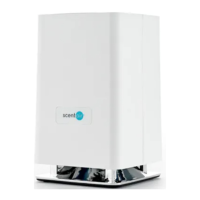

 To Next Page