English - 57 -
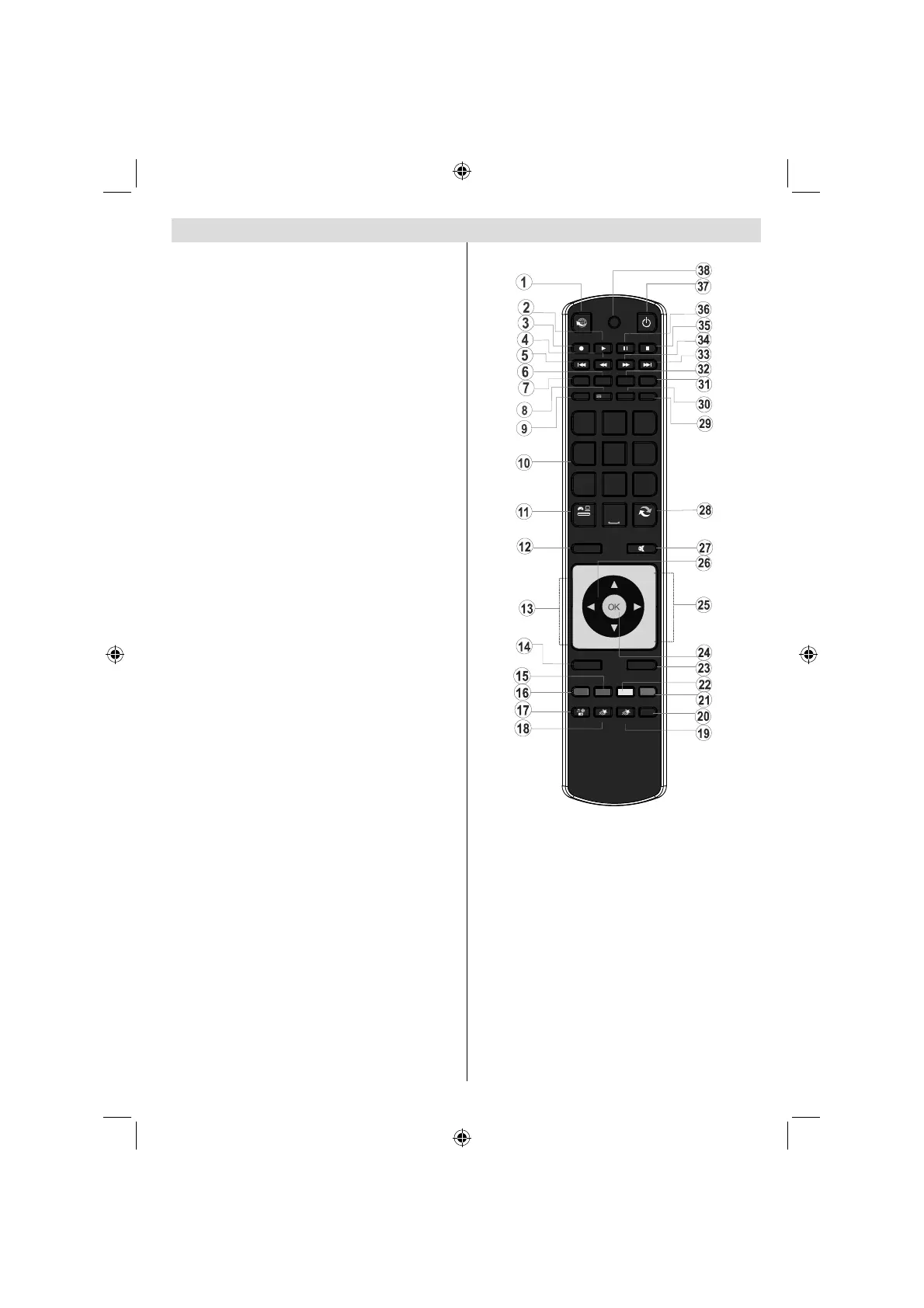
Remote Control Buttons
No function1.
Play (in Media Browser mode) 2.
No function3.
Fast rewind (in Media Browser mode)4.
No function5.
Mono/Stereo - Dual I-II / Current Language (*) / 6.
Play preview (in Media Browser mode)
Image size 7.
Teletext / Mix8.
Electronic Programme Guide9.
Numeric buttons10.
AV / Source11.
Menu on/off 12.
Programme Down - Page up / Programme Up - 13.
Page down
Back to previous menu 14.
Green button15.
Red button16.
Media Browser17.
My Button 1(**)18.
My Button 2: Switches between digital, satellite 19.
and cable broadcasts (***)
Info / Reveal (in TXT mode)20.
Blue button21.
Yellow button22.
Exit (in DTV mode) / Return / Index page (in TXT 23.
mode)
OK / Select / Hold (in TXT mode) / Channel List24.
Volume up / down25.
Navigation buttons26.
Mute27.
Previous programme / Now (in EPG mode)28.
Sleep timer29.
Favourite mode selection30.
Picture mode selecion / Changes picture mode 31.
(in Media Browser video mode)
Subtitle on-off / TXT subtitle (analogue TV mode) 32.
/ Subtitle (in Media Browser mode).
No function33.
Fast forward (in Media Browser mode)34.
Stop (in Media Browser mode)35.
Pause36.
Standby37.
Operation LED light38.
P -
P +
SOURCE
GHI
PQRS
SCREEN
MENU
EPG
BACK
1
4
7
-
V +
V
SWAP
ABC DEF
JKL MNO
TUV WXYZ
LANG
SUBTITLE
INFO
PRESETS
FAV SLEEP
TEXT
EXIT
2
3
5
6
8
9
0
Y BTN 1MUTO Y BTN 2MUTOMULTIMEDIA
INTERNET
(**) MY BUTTON 1: When on a desired source,
channel or link, press MY BUTTON 1 for
fi ve seconds, until the “MY BUTTON IS SET”
message is displayed on the screen. This
confirms that the selected MY BUTTON is now
associated with the selected function.
(***) MY BUTTON 2: This button’s main function
is to switch between DVB-T, DVB-C and DVB-S
broadcasts. However, if you press MY BUTTON
2 for fi ve seconds, you can set a function to it
as described in My Button 1.
Note that if you perform fi rst time installation,
MY BUTTON 2 will return to its default function,
switching between DVB-T, DVB-C and DVB-S
broadcasts.
A02_[GB]_MB70_5112UK_DVBT_C_S2_32884W_GOLD11_10076633_50207316.indd 57A02_[GB]_MB70_5112UK_DVBT_C_S2_32884W_GOLD11_10076633_50207316.indd 57 07.12.2011 13:49:2907.12.2011 13:49:29


 To Next Page