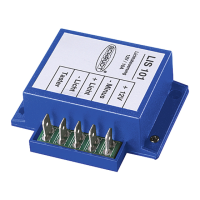
Operating Instructions for LIS 101 Light Control System
4
Date: 28.02.2011 822.381 BAMA / EN
Y
Only buttons (closers) and no switches may be used for the connection.
Buttons automatically return to their original state after being pressed.
Connect the dimmer in the following order (also refer to circuit diagram):
1. Disable 12V supply.
2. Directly connect the lighting to the LIS 101 dimmer with a 2-wire cable.
3. Connect one (or more) light switches as follows:
F
Connect one lead of the button to the Minus ”--” or the ”+12V” of the
12V supply
F
Connect the other lead of the button to the ”Taster” connector on the
LIS 101 dimmer.
F
If available, connect any further buttons in the same way (parallel).
4. Connect the Plus ”+” of the supply to ”+12V” on the LIS 101 dimmer.
5. Connect the Minus ”--” of the supply to ”-- Minus” on the LIS 101 dimmer.
2.3 Technical details
2.3.1 Mechanical data
68x23x57(WxHxDinmm)
40g
Black plastic
2.3.2 Electrical details
for 12V DC systems (10.5 to 15V)
max. 10 A
max. 5mA
2.3.3 Environmental parameters
-10 °Cto+45 °C
-20 °Cto+70°C
Operation in dry environment only
CE marked
Connection sequence
Dimensions
Weight
Housing
Operating voltage
Current
Standby current
(lighting off)
Operating temperature
Storage temperature
Humidity
CE


 To Previous Page
 Loading...