INPUTS
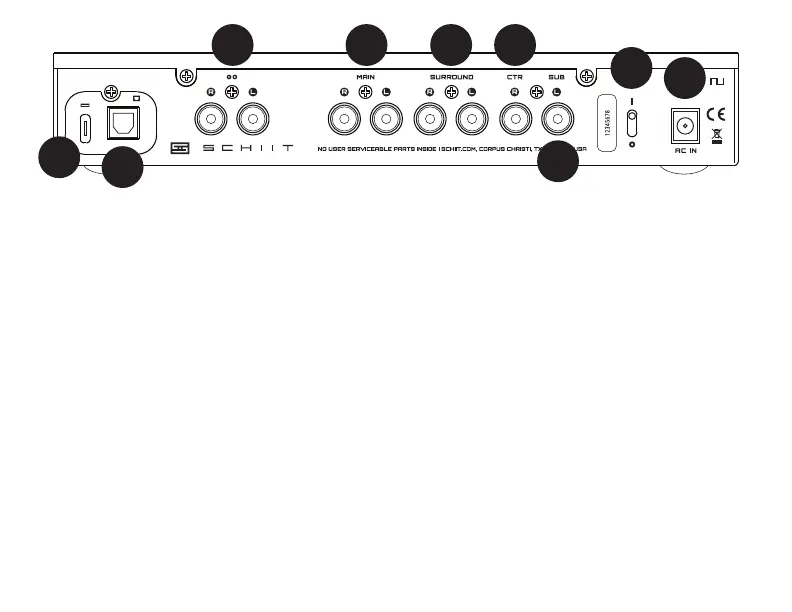
1 USB Digital Input. Connect a USB source
here. Our USB input is compatible with all
modern streamers, computers, tablets,
phones, and many consoles without driv-
ers. You’ll need a USB-C terminated cable
on our side, with the other side to match
your source.
2 Optical Digital Input. Connect an optical
source here. You’ll need a digital optical
cable, preferably less than 3m in length.
An “optical source” means, typically, a TV*,
though you can also use any audio device
with 2-channel SPDIF audio output, like a
CD player.
3 Analog Input. Connect any analog
source here using good-quality RCA
cables. Already have a DAC you want
to use? Connect it here. Any xed-level
analog source will work ne.
*IMPORTANT: Your TV may need to be set to
“2-channel PCM” or “Stereo” output in order to get
sound out of it. Using “Surround” or “5.1” or “Multi-
channel” will not work. You’ll have to go through the
Sound menu to nd these settings. For help on a
specic TV, contact the manufacturer.
CONNECTION
1
3 5
2
4 6
7
8
9


 To Next Page
 Loading...