The Schiit Syn is a versatile audio device designed to provide a comprehensive sound experience, whether for surround sound, stereo listening, or dedicated headphone use. It functions as a remote-controlled DAC (Digital-to-Analog Converter), preamp, and a powerful discrete headphone amplifier, with an integrated microphone input for gaming.
Function Description:
The Syn aims to deliver a "surround set free" experience, meaning it works with any source and is designed to be future-proof against changing audio standards. It can be integrated into a media room, living room, or desktop setup.
For surround sound, the Syn processes 2-channel PCM audio from digital or analog sources to create a multi-channel output. It supports up to 6 speakers: Main Left and Right, Surround Left and Right, Center, and Subwoofer. The device provides line-level outputs, requiring external amplifiers or powered speakers for all channels. Users can choose to use a subset of these speakers based on their preferences and setup, as the system is flexible and allows for experimentation without risk of damage. For instance, a subwoofer might not be needed with large main speakers, and a center channel might be omitted for stereo-focused surround.
For stereo listening, the Syn operates as a high-quality remote-controlled DAC/preamp. It features an ESS DAC, discrete main channels, Alps potentiometers, thin-film resistors, and film capacitors, all contributing to its "exceptional all-in-one performance." It can be used in dedicated listening rooms, media rooms, living rooms, or any environment where high-fidelity stereo sound is desired. The device also offers an option to augment stereo sound with ambience by enabling the surround channels, even when primarily used for stereo.
As a dedicated headphone system, the Syn incorporates a fully discrete, high-powered headphone amp stage. It includes optional processing to make headphone listening more speaker-like. This makes it suitable for serious headphone enthusiasts, as well as for late-night movies and gaming. When headphones are plugged in, all other outputs are muted. The Width and Presence controls, when enabled with headphones, utilize frequency shaping to simulate a crossfeed effect, enhancing the speaker-like experience.
The integrated microphone input caters to gamers, allowing for the connection of an electret microphone from a gaming headset.
Important Technical Specifications:
- Inputs:
- 1 USB Digital Input: USB-C terminated on the Syn side, compatible with modern streamers, computers, tablets, phones, and many consoles without drivers.
- 1 Optical Digital Input: Requires a digital optical cable (preferably less than 3m). Typically used with smart TVs (set to 2-channel PCM or Stereo output, not Surround, 5.1, or Multi-channel) or other SPDIF audio devices like CD players.
- 1 Analog Input: RCA inputs for connecting any fixed-level analog source, such as a DAC, phono preamp, or CD player.
- Outputs (Line-Level):
- Main Left and Right Output: For main stereo speakers.
- Surround Left and Right Output: For surround speakers.
- Center Output: For the center channel speaker.
- Subwoofer Output: For a powered subwoofer (LFE input, MONO input, or via RCA Y-cable to left and right RCA inputs).
- Headphone Output: Dedicated headphone jack.
- Microphone Input: For electret microphones from gaming headsets.
- Power:
- Power Cable Input: Barrel connector for the supplied wall-wart.
- Power Adapter: 14-16VAC, 1-2A AC power adapter (DC wall warts are not compatible).
- Internal Components: ESS DAC, discrete main channels, Alps potentiometers, thin-film resistors, film capacitors.
Usage Features:
Front Panel Controls:
- Input Select: Button to cycle through USB, Optical, and Analog inputs. An indicator light shows the active input. A flashing light indicates a muted input (mute function is remote-only).
- Mode Select: Button to cycle through processing modes. Indicator lights show the active mode:
- No lights: Stereo output only, all surround channels off, no processing.
- Left light only: Surround channels on, no processing of main channels.
- Right light only: Surround channels off, Width and Presence controls on, affecting main channels (remote-only access).
- Both lights: Surround channels on, Width and Presence controls on, affecting main channels and headphone output.
- Headphone Jack: For private listening. Plugging in headphones mutes all other outputs.
- Surround Level: Controls the output level of surround channels relative to the master volume, adjusting ambience.
- Center Level: Controls the output level of the center channel, adjusting for a solid center image for voices and vocals.
- Master Volume: Knob to control the volume of all channels (Surround, Center, Sub). Also adjustable via remote.
- Width: Increases or decreases apparent stereo separation to widen or narrow the soundstage. Useful for solidifying the center image in movies/shows with a center channel, or for reducing the "in your head" feeling in headphone listening.
- Presence: Increases or decreases the presence region to bring vocals closer or farther away. Useful for meshing a center channel with main channels and reducing harsh dialogue sound.
- Microphone Input: For gaming headsets with electret microphones.
Rear Panel Controls:
- Power Switch: Toggles power on/off. It's safe to leave Syn on all the time, as it runs slightly warm.
Remote Control Features:
- Volume Up/Down: Increases or decreases volume. The front panel volume knob rotates in sync.
- Input Select: Steps through USB, Optical, and Analog inputs.
- Process: Toggles surround channels on/off. This mode adds channels without affecting the mains.
- Shape: Enables/disables Width and Presence controls for all channels (main, surround, headphone output).
- Mute: Mutes all outputs. The front panel input light flashes when muted.
Additional Remote Functions: Center Level, Surround Level, Width, and Presence can be adjusted via the remote, though this typically requires assistance from another person due to the lack of visual feedback on the remote itself.
Maintenance Features:
- Cleaning: Clean only with a dry cloth.
- Ventilation: Assure adequate ventilation; do not block openings or place near heat sources.
- Power Cord: Use only the supplied power cord or a suitable replacement. Route cords away from traffic areas and protect them from pinching. Unplug if unused for long periods.
- Servicing: Refer all servicing to qualified service personnel. Service is required for damage, liquid spills, objects falling into the device, exposure to rain/moisture, or if the device does not operate normally or has been dropped.
- Battery Replacement: The remote control battery slides out from a tray at the bottom and should be replaced with the same type when needed.
- Warranty: Schiit Audio provides a two (2) year warranty on material and workmanship from the date of purchase. An extended 5-year limitation applies to implied warranties. Warranty service requires contacting Schiit Audio first for a Return Authorization (RA). The warranty does not cover modified, tampered, damaged by negligence/accident/unreasonable use, or altered/removed serial numbers.

 Need help?
 General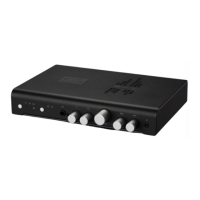

 To Next Page