CD transport and USB hub? Yes. Not
only is Urd the only CD player with
Unison USB™ output, it also has two
Unison USB inputs. So feel free to mix it
up—spin CDs, enjoy your streamer, and
connect a tablet or computer or phone,
too. It even converts to SPDIF! Kinda
crazy? Nah, it’s just the one product you
need to tie all your digital together.
INTRODUCTION
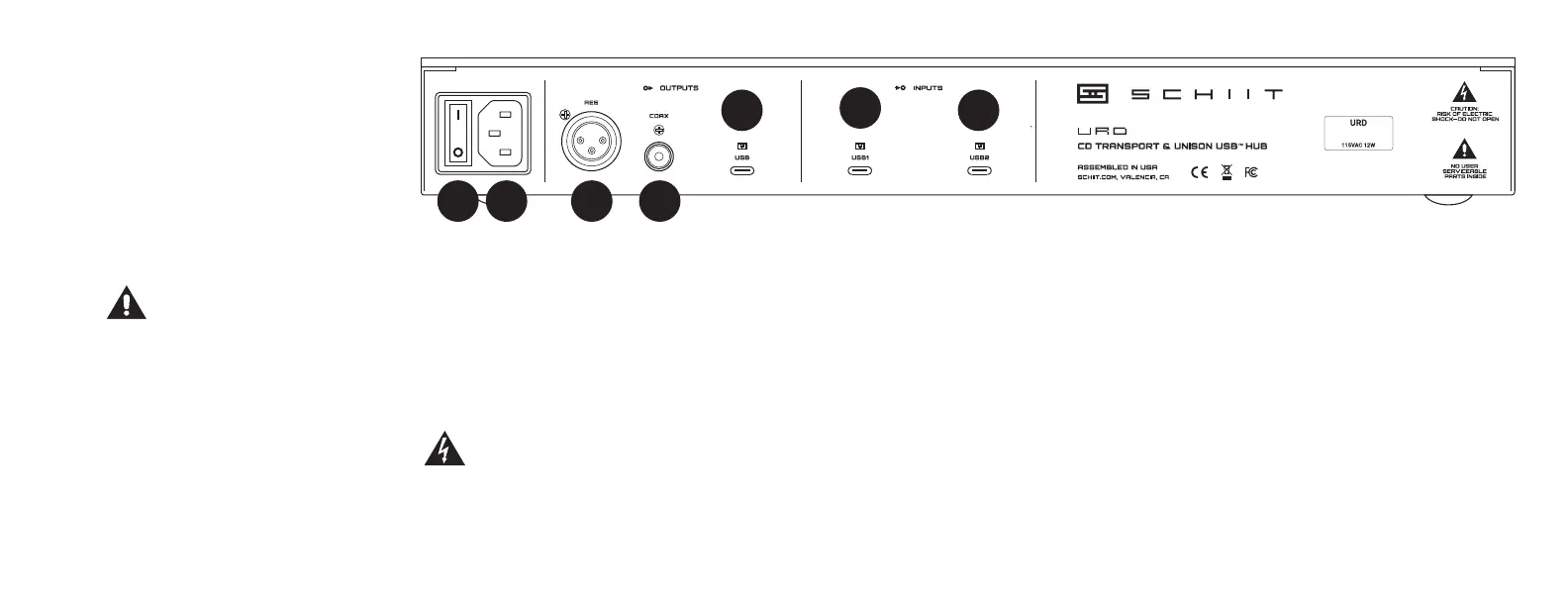
CONNECTIONS
1 Power switch. Up is on, down is off.
It only works when it’s on.
2 AC input. Connect the supplied AC cord
here, or Urd won’t work even if the power
switch is on.
SPDIF Outputs
3 AES digital output. Urd outputs digits
just ne using the older AES and SPDIF
standards. If you have a DAC with an AES
input, connect it here using an XLR cable.
4 Coax digital output. Connect any DAC
with a coax input using an RCA cable.
USB Output
5 USB output. Urd also outputs digits
using USB—Unison USB, in fact. Connect
to any DAC that supports UAC2, as in, USB
Audio Class 2, the standard of the industry
for USB audio transmission.
USB Inputs
6 and 7 USB inputs. Inputs? Yes, inputs.
Connect any streamer, computer, tablet or
phone here so you can play them through
the Urd’s USB or SPDIF outputs, for a
complete digital hub.
The following is required by the roughly 9,542
government agencies and regulations we have
to comply with. If you have some common
sense, they should seem pretty straightforward. In any
case, read these instructions before proceeding farther,
follow all instructions, and heed all warnings. Or else!
1. If you don’t know how to install audio devices, get a
qualied professional to help.
2. Never use this device near water, and clean only with
a dry cloth.
3. Assure adequate ventilation, do not block any ventila-
tion openings, or place near heat sources.
4. Use only the supplied power cord or suitable replace-
ment. Route cords away from trac areas and protect
them from being pinched. Unplug the cord from the out-
let if the apparatus is unused for a long period of time.
01234567
1
3 4
5
2
5. To prevent electric shock, do not use the plug with an
extension cord, receptacle, or outlet unless blades can be
fully inserted.
6. Refer all servicing to qualied service personnel. Service
is required when the device has been damaged, including
cord or plug damage, liquid has been spilled or objects have
fallen into the device, the device has been exposed to rain or
moisture, does not operate normally, or has been dropped.
WARNING: TO REDUCE THE RISK OF FIRE OR
ELECTRIC SHOCK, DO NOT EXPOSE THIS DEVICE
TO RAIN OR MOISTURE.
6
7



 To Next Page
 Loading...