12 45:26
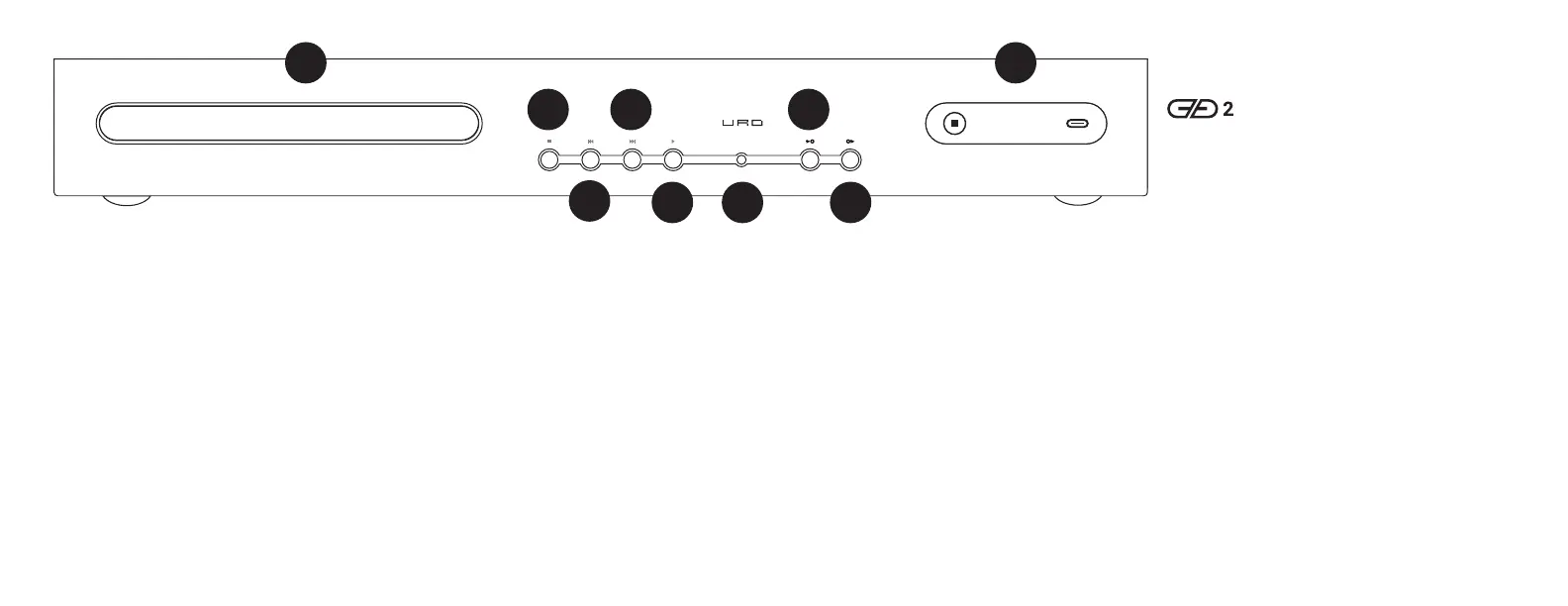
1 CD Tray. Put your CD in here. After
ejecting the tray, that is. And by “CD,” we
mean Redbook CD, not some weirdo thing
with SACD or MP3s or FLAC on it. And no,
it’s not for holding your coffee mug either.
CD CONTROLS
2 Stop/Eject. Press once to stop the CD.
Press and hold to eject the CD.
3 Skip Back/Fast Reverse. Press to skip
to the previous track when a CD is playing.
Press and hold for fast reverse. And yes,
we know it takes a while to switch to fast
reverse. Relax, guys. This is a spinning
disc with physical momentum. It’s not a
bajillion gigahertz modern processor, tuned
to anticipate your touch. This is how these
things work. Heck, you probably don’t even
remember rewinding VHS tapes. Sheesh.
4 Skip Forward/Fast Forward. Press to
skip to the next track when a CD is playing.
Press and hold for fast forward.
5 Play. Press to play a CD. Press again to
pause. Press a third time to play again.
Sit back and remember the glory days of
the 1980s and 1990s, when people weren’t
glued to their phones and screens were in
living rooms, not in cars.
OPERATION
1
3
2
5
If you see this icon:
It means your DAC is not compatible with
Urd, or you have a bad or incompatible cable.
Remember, Urd supports only UAC2 compliant
DACs, because this is the universal industry
standard. If you have an old DAC, it may not
support UAC2. If your DAC requires drivers,
it’s likely not UAC2 compliant. If you have an
old USB cable, it may not even support USB
2.0 speeds. Try a different DAC and a different
cable.
8 Output Select. Press to select the output you
want to use: USB or SPDIF. Sorry, USB and SPDIF
cannot be run simultaneously.
9 Display. Displays (duh) the input and output,
as well as CD time (if you’re using a CD). See the
next section for more info on the display icons.
6
4
6 Remote sensor. Don’t block this if you want
the remote to work.
INPUT / OUTPUT CONTROLS
7 Input Select. Press to cycle through the
inputs—CD, USB1, and USB2. The selected
input will be displayed on (9), the display.
Don’t see the input you want? Keep pressing,
and it’ll cycle back to it.
Please note that USB inputs that are
disconnected or incompatible will display
a “USB connection broken” icon rather than
a USB icon.
8
7
9
12 45:26
SRC
OUT
01 00:26
SRC
OUT
SRC
OUT
SRC
OUT
SRC
OUT
12 45:26
01 00:26
SRC
OUT



 To Next Page
 Loading...