OMG look at this crazy thing. It only has
icons and some numbers! It doesn’t even
display the album art!
Relax. We made the icons super simple.
You’ll get the hang of it in no time.
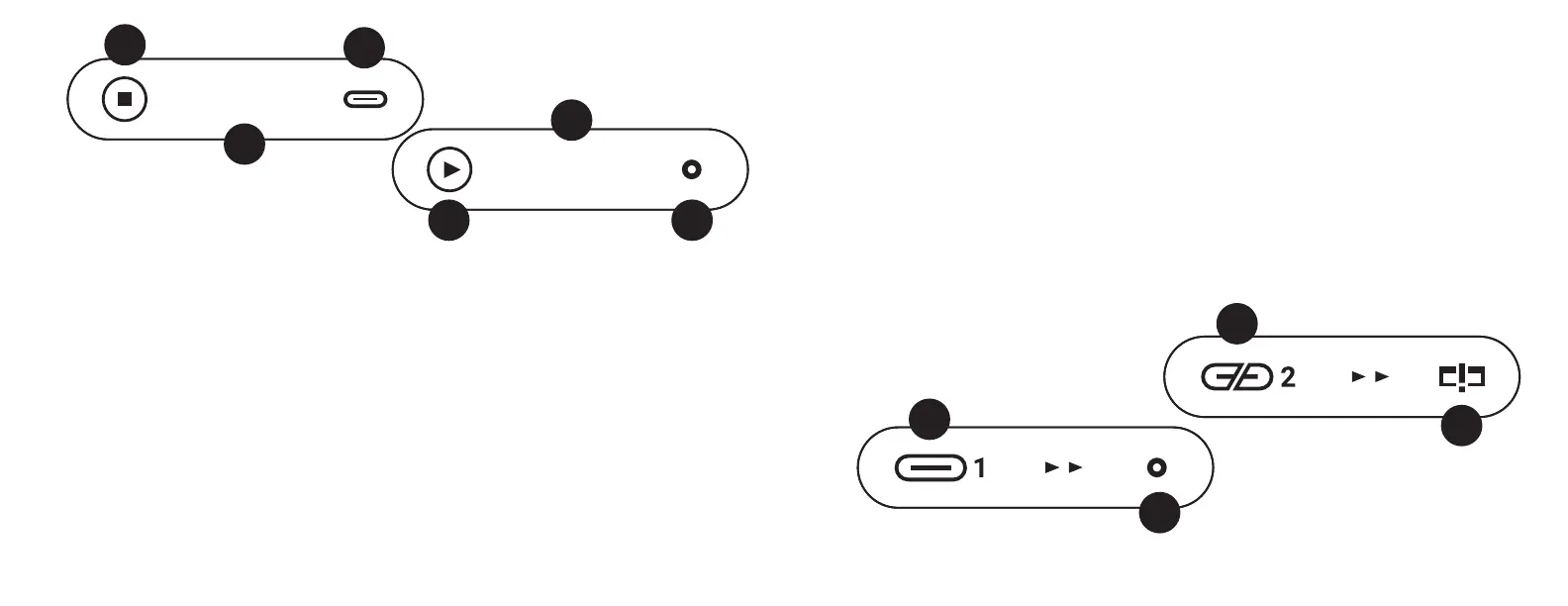
CD Display. Insert a CD and you’ll get some-
thing like this.
1 Input. In this case CD. It also shows the
mode--CD stopped.
2 Total tracks and total time. This shows
the number of tracks and total time.
3 Output. In this example, USB. Yes, a mod-
ern USB-C, because that’s what Urd uses.
DISPLAY
12 45:26
SRC
OUT
01 00:26
SRC
OUT
SRC
OUT
SRC
OUT
SRC
OUT
12 45:26
1
3
2
12 45:26
SRC
OUT
01 00:26
SRC
OUT
SRC
OUT
SRC
OUT
SRC
OUT
12 45:26
01 00:26
12 45:26
SRC
OUT
01 00:26
SRC
OUT
SRC
OUT
SRC
OUT
SRC
OUT
12 45:26
01 00:26
SRC
OUT
12 45:26
SRC
OUT
01 00:26
SRC
OUT
SRC
OUT
SRC
OUT
SRC
OUT
12 45:26
01 00:26
SRC
OUT
4
6
5
CD STOPPED
Now, press Play on the CD, and it’ll change.
4 Input. Still on CD, but now it shows a play
icon inside because it’s playing. It’ll show a
pause icon inside when it’s paused, and
fast-forward/fast-reverse when you’re using
those functions.
5 Current track and time. Now it shows
which track is playing (01) and the elapsed
time (26 seconds).
6 Output. Now we’ve changed the output to
SPDIF, just to mix things up.
See, pretty easy!
USB Display. Switch over to a USB input and
you’ll see something like this.
7 Input. In this case, USB 1. There are two
USB inputs: USB 1 and USB 2.
8 Output. In this case, SPDIF output. So, in
this example, you’re using Urd to convert a
USB input to SPDIF output, and there are no
issues.
Now, let’s see what the issues look like.
9 Input. In this example, USB 2.The icon
looks broken, though, because nothing is
connected to USB 2, or it’s connected to
an incompatible source or connected with
an incompatible USB cable. Remember,
sources must be UAC2 compliant, and
cables must be USB 2.0 minimum speed,
recommended 2m or less in length.
10 Output. In this case, we’ve selected USB
output, but the DAC isn’t UAC2 compliant.
With Urd, both the sources and DAC need
to be UAC2 compliant, unless you want to
switch to SPDIF output to accommodate
an older DAC design.
7
9
10
CD PLAYING
USB TO SPDIF
USB TO USB WITH ISSUES
8



 To Next Page
 Loading...