14
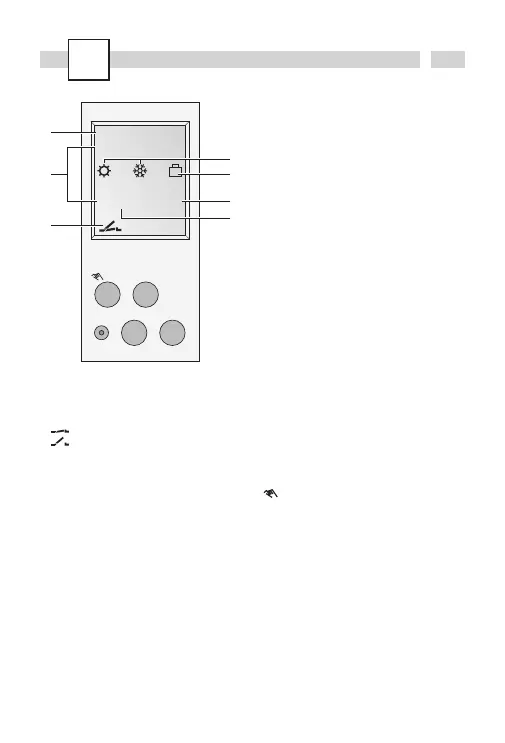
Display
A Channel status display
= Channel 1 ON
= Channel 1 OFF
B 2 communication lines for time display,
menu items, entry prompts etc.
C Day-of-week display
D Display of summer/winter time
E Holiday mode display
F Display of AM/PM
G Operating voltage (permanently lit dots)
Reserve power operation (dots flash)
General information
· The middle communication line shows the
selectable menu item. If confirmed with
OK,
this item is activated.
· Flashing texts or symbols require an entry.
· If no entries are made within the next
2 minutes, the clock reverts to Auto mode.
· The time switch has a
sleep-function when
not connected to power supply, that keeps
screen blank. This function is activated after
2 minutes of no key board operations.
All settings saved will remain in the memory.
Buttons
+ Scroll up in menu
Press briefly = +1
Press and hold (approx. 2 sec) = +5
– Scroll down in menu
Press briefly = -1
Press and hold (approx. 2 sec) = -5
Manual operation in the automatic
mode
Res The programs are retained in the case
of a reset. The date and time must be
set again. Press reset button with a
blunt object (pen).
Menu Exits the Automatic mode and enters
the Programming mode
Esc Press briefly = one step back
Press and hold (approx. 2 sec) = return
to Automatic mode
ok Make selection and apply
1 2 3 4 5 6 7
PROGRAM
14
:
26
AM
PM
FIX
Res Menu ok
Esc
–+
A
B
C
F
E
D
G


 To Next Page
 Loading...