7
english
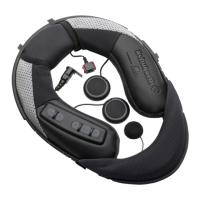
Attach the SRC-System to your helmet.
Turn on the SRC-System.
1. Press the mobile button steadily for at least 4 seconds.
2. Led indication: 3 blue fl ashes.
3. Audio feedback: ascending tone (low-high).
Pairing to a Bluetooth
®
mobile phone.
1. Switch on your SRC-System.
2. Press and hold the mobile button for at least 6 seconds
until the red and blue lights begin rapidly alternating.
3. Search for Bluetooth
®
SRCS device on your phone.
4. Enter 0000 (4 zeros) as your PIN or passkey.
Answer a call During an incoming call tap the
mobile button or speak loudly any
word of your choice.
Reject a call Remain silent for 15 seconds, or
press and hold the mobile button for
3 seconds during an incoming call.
Terminate a call Tap the mobile button during a call,
or let the other party terminate the
call.



 To Next Page