5
2. DEVICE DESCRIPTION
Schwaiger home automation gateway takes central place in home automation system.
Combined with Schwaiger client (Android/iOS/HTML) applications and Schwaiger cloud service
it provides a turnkey platform that covers lighting, security, safety, energy management and other
aspects of the fast-growing home automation markets.
By supporting the most popular wireless communication protocols today (Zigbee, Z-Wave, IP),
Schwaiger gateway communicates with connected devices and enables users to monitor and con-
trol their home.
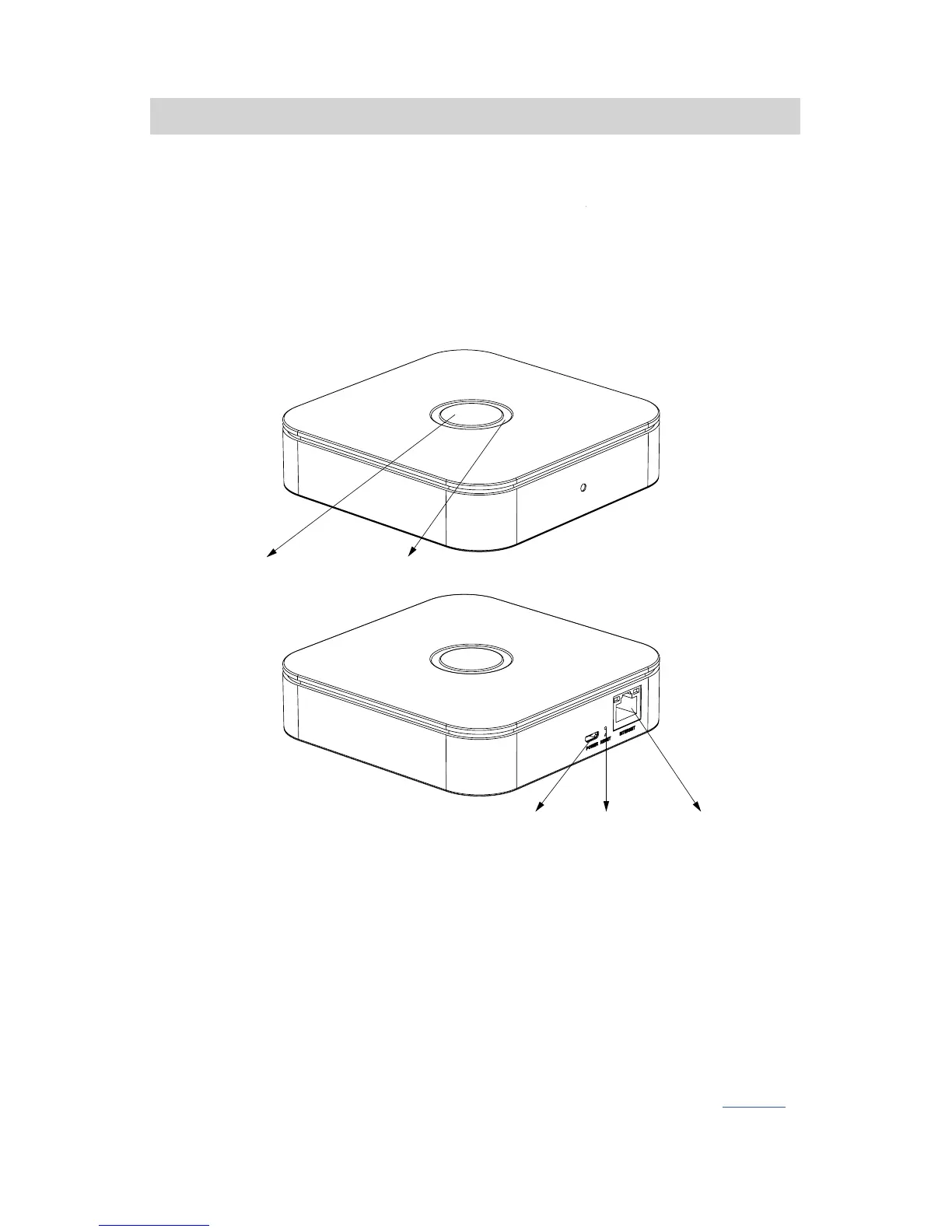
Illustration 1: Schwaiger home automation gateway
Schwaiger home automation gateway consists of:
• MAIN button, which is used to manage home automation devices
• BACK button, which is used to reset user data, reset the gateway network, reboot the gateway
and reset the gateway to factory default settings
• LED indicator informs user about gateway status
• Power supply socket
• Ethernet
Use of these buttons is described in more detail in the corresponding section of this manual (page 23).
Main button
FRONT
BACK
Power supply socket Back button Ethernet
LED indicator



 To Next Page