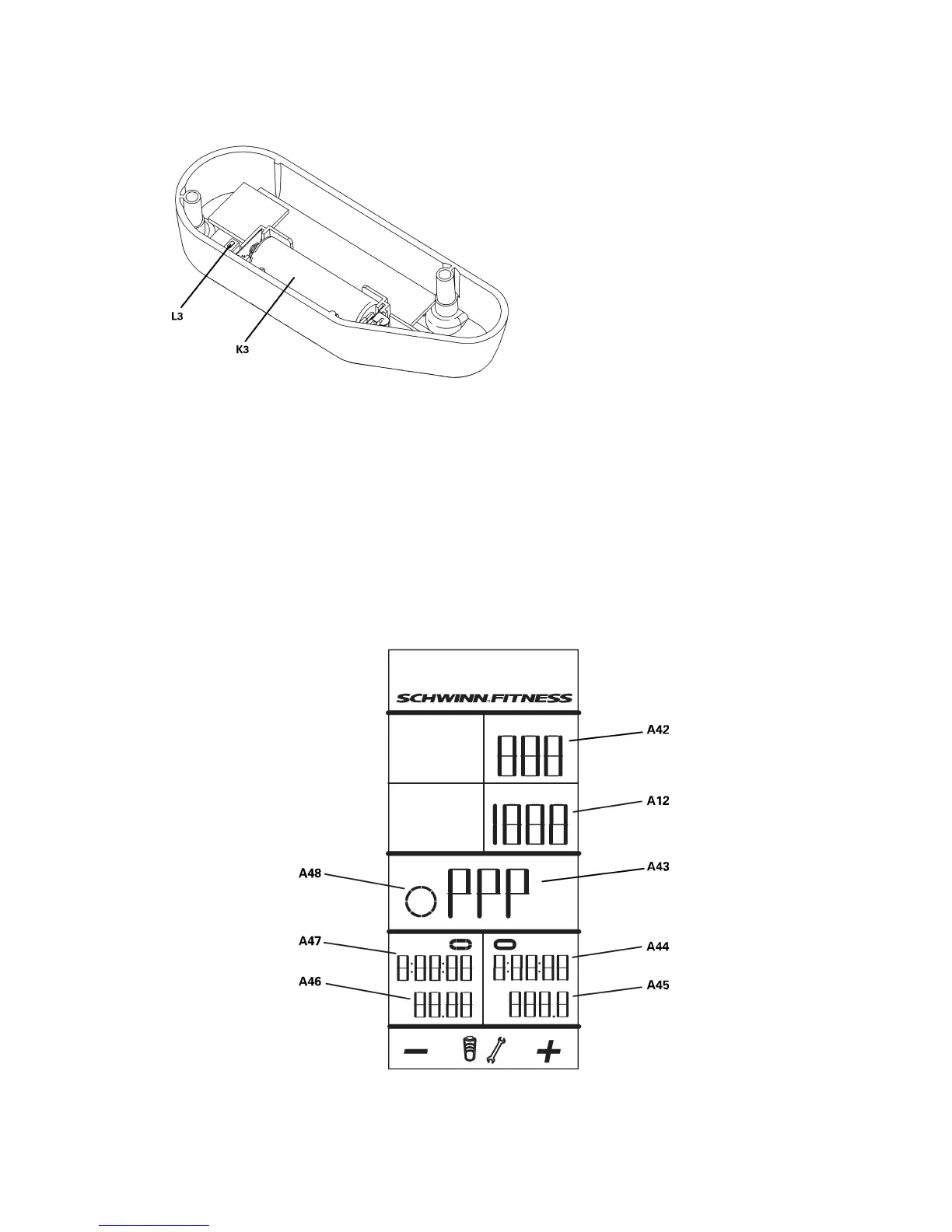
Power
Sensor
2.PushtheSTAGEandAVG/ENDbuttonsfor5secondstogotoServiceMode.
3.TaptheAVG/ENDbuttonuntilyouseetheP––menuoption,andpushtheBacklightbutton.
4.PushtheSTAGEorAVG/ENDbuttontoseetheP––submenuoptions—PE0(notpowerenabled)andPE1(powerenabled).
• •
•
IfyouhaveaPowerSensor,gotothePE1optionandpushtheBacklightbuttontosetPE(powerenabled).
• •
•
IfthereisnoPowerSensor,gotothePE0optionandpushtheBacklightbuttontosetNPE(notpowerenabled).
5.TheconsolegoesbacktotheServiceModemenuandtheP––menuoptionappears.
6.Makesurethattheswitch(U)ontheSpeedSensorissettoS(speed).
7.PushthepairingbuttonsontheConsole(L1),theSpeedSensor(L2)andthePowerSensor(L3),ifapplicable.
8.TheconsoledisplayshowsPPPandthetimedisplaycountsdownfrom0:35(seconds).
12 12
12



 To Next Page