EasyManua.ls Logo

SciCan StatClean SC-P4862 - User Manual

SciCan StatClean SC-P4862
18 pages
Print Icon
To Next Page IconTo Next Page
Loading...
StatClean
®
- Ultrasonic Cleaner
USER MANUAL
FEATURES:
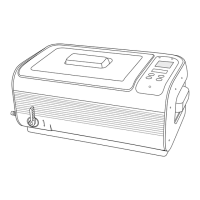
Large tank capacity Tank capacity 6.0 L / 1.6 gallon.
Tank size: 34.0 x 20.5 x 9.9 cm / 13.4” x 8.1” x 3.9”
Stainless Steel Rack and
Basket
Use rack when using cassettes and basket for loose
instruments.
Control panel with capacitive
sensing technology
Solid panel top. Durable, reliable, resistant to water and harsh
chemicals.
Drainage valve Convenient to use.
Memory feature Recalls last timer settings.
Two industrial grade
ultrasonic transducers
Uniform distribution of ultrasonic waves, strong cleaning, high
durability.
3-color LED display 1 to 30-minute full range timer, degas, and thermometer.
Independent control circuit
for each ultrasonic transducer
40% higher cleaning efficiency, not susceptible to interference,
more durable.
Multiple circuit protectors When overloaded or improperly used, the protectors shut down
the power to certain areas to protect the machine.
Moisture-proofed PCB with
industrial IC
Capable for different working environments with better anti-
interference performance.
Two cooling fans One for cooling of PCB boards, one for cooling of ultrasonic
transducers. Improve heat dissipation and beneficial for
continuous operations.
Solid and advanced structural
design
4.5 mm thick wall housing made from engineering grade plastic
with tongue-in-groove design for better waterproof and drop-
proof performance.
SD-485 NA EN R2. StatClean is a registered trademark and
Your Infection Control Specialist
is a trademark of SciCan Ltd.
Question and Answer IconNeed help?

Do you have a question about the SciCan StatClean SC-P4862 and is the answer not in the manual?

Summary

Safety Precautions

Child Safety Warning

Appliance and cleaner are potential life hazards to children. Keep them away and out of reach.

Electrical Shock Prevention

Observe precautions like not using while bathing, never immersing device in water, and using dry hands.

Fire Hazard Prevention

Do not set unit on soft surfaces or block vents. Keep vents free from any obstructions.

Important Safety Instructions

Follow basic precautions when using electric appliances, including using recommended attachments and not outdoors.

Control Panel and Operations

Start;Stop Key

Touch twice to start or stop cleaning. Needs to be touched within 6 seconds to turn on or off.

Degas Key

Touch to illuminate Degas status. Touch Start/Stop to begin degassing for 90 seconds.

Operation Guidelines

Unit Set Up

Connect power cord, turn on power switch. LED displays 10:00. Adjust timer using TIME+ and TIME- keys.

Degas Procedure

Add water and cleaning solution, touch Degas button, operate for 90 seconds.

Loading Instruments

Place items in basket, lower into tank. Ensure water level is between MIN and MAX.

Cleaning Process

Place lid, set timer, touch Start/Stop twice to activate. Retrieve items after cycle completion.

Retrieving Instruments

Open lid when cleaning is complete. Retrieve cassettes or basket. Wipe condensation from lid.

Memory Operations

Care and Maintenance

General Maintenance Guidelines

Do not turn on without water, avoid continuous operation, do not keep chemicals overnight, avoid spraying water on housing.

SciCan StatClean SC-P4862 Specifications

General IconGeneral
BrandSciCan
ModelStatClean SC-P4862
CategoryUltrasonic Jewelry Cleaner
LanguageEnglish