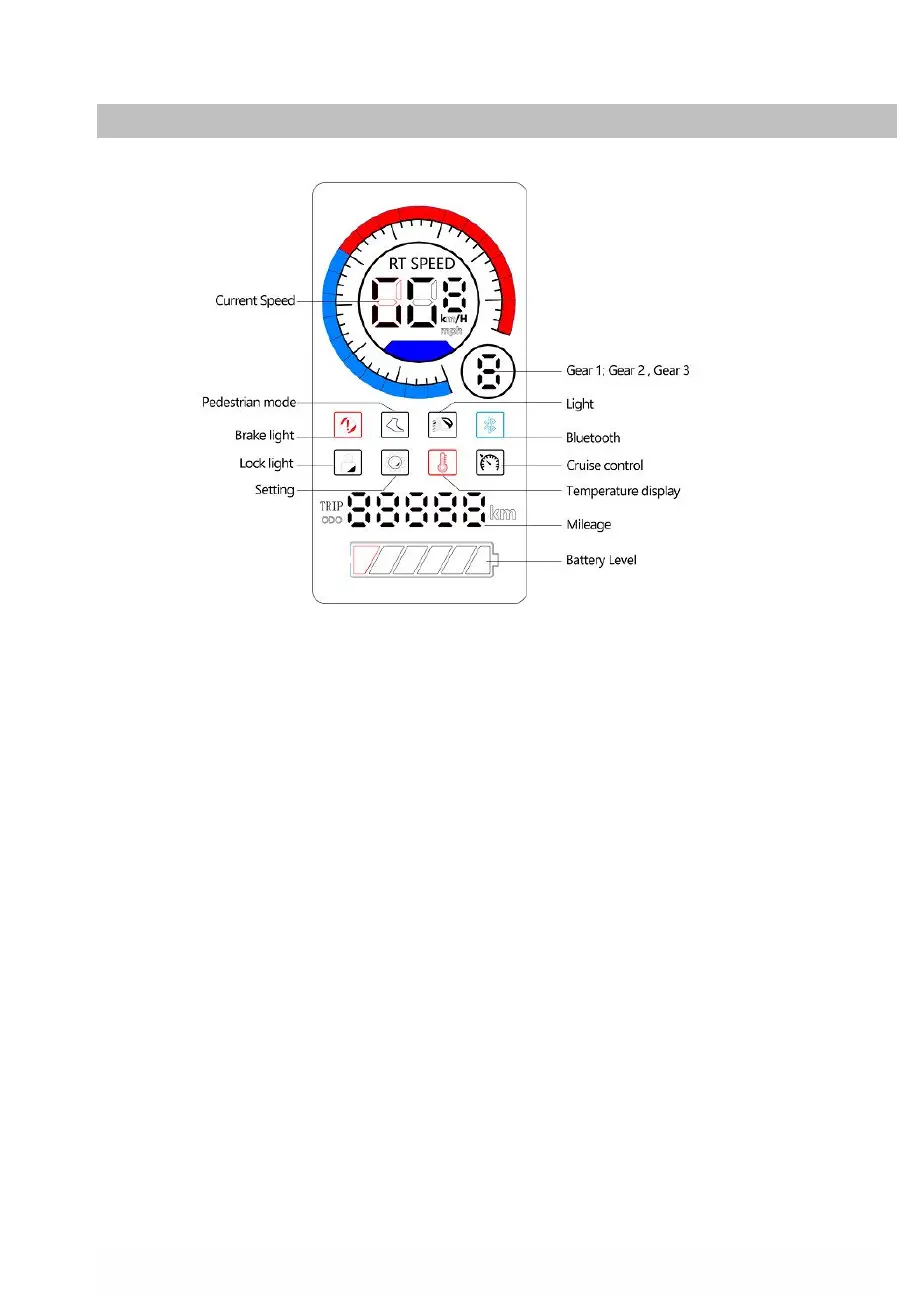
4. Control Information / Control Panel
1. Speedometer: Display the current speed of the scooter
2. Riding Mode: Gear 1 : Pedestrian mode ( up to 6km/h) ;
Gear 2 : Comfort Mode (up to 20km/h);
Gear 3: Sport Mode (up to 25km/h)
3. Brake Light : Light up when braking.
4. Pedestrian mode : Light up when the mode is Gear 1.
5. Headlight
:
Light up when the light is on.
6. Bluetooth
7. Lock light: Light up when locked.
8. Setting light: Light up when there is a fault.
9. Over-temperature display: Light up when the temperature is high.
10. Cruise Control: Maintenance of speed. It is activated after the same speed
has been maintained for a few seconds.
11. ODO: Total distance travelled.
12. Trip: Single trip distance
13. Battery level


 To Next Page