EasyManua.ls Logo

Scosche IDR655m - User Manual

Scosche IDR655m
32 pages
Print Icon
To Next Page IconTo Next Page
Loading...
SCOSCHE
IDR655m
INCREASED
DYNAMIC
RANGE"
NOISE
ISOLATION
EARPHONES
WITH
tapLINE™
CONTROL
Made
for
Works
with
TL
Ploneses
iPod
nano
0
iPod
shuffle
16GB
32GB
=|
Sth
generation
(video
camera)
1
3rd
generation
IPO
1
one
D|
868
1668
2GB
4GB
5
©!
PARTS
INCLUDED:
DO
iPod
touch
[EN
ipod
ctassic
(1)
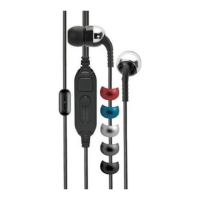
Set
of
earphones
2nd
generation
=
(3)
Sets
single
flanged
silicone
inserts
(S/M/L)
вов
1668
3268
6468
|(C)]
12068 16068
(2009)
(3)
Sets
dual
flanged
silicone
inserts
(S/M/L)
(1)
Travel
pouch
De]
6
E
INSERTING
THE
EARPHONES
USING
THE
PROPER
SIZE
SILICONE
INSERT
IS
VERY
IMPORTANT
FOR
SOUND
QUALITY
PERFORMANCE
AND
COMFORT
An
insert
that
fits
properly
will
seal
to
your
ear,
help
to
isolate
against
external
sounds
and
dramatically
increase
bass
response.
We
encourage
you
to
try
the
various
silicone
insert
sizes
and
styles
included
to
find
the
perfect
fit.
WARNING:
Use
caution
when
inserting
the
earphones.
If
inserted
beyond
the
ear
canal
items
may
become
lodged
inside
your
ear
canal.
Before
insertion,
verify
that
the
silcone
inserts
are
securely
fixed
to
the
earphone
stem.
Do
not
use
the
earphones
without
the
silicone
inserts.
IMPORTANT!
DO
NOT
RETURN
PRODUCT
TO
THE
RETAILER
IF
YOU
NEED
ASSISTANCE
OR
REPLACEMENT
PARTS
CALL
US
TOLL
FREE:
1-800-621-3695
X3
HOURS
MON-FRI
8AM-5:30PM
(PST)
SATURDAY
8AM-2PM
(PST)
(English)
©2010
SCOSCHE
INDUSTRIES,
INC.
SI
-
2/10
300IDR655m

Other manuals for Scosche IDR655m

Question and Answer IconNeed help?

Do you have a question about the Scosche IDR655m and is the answer not in the manual?

Summary

tapLINE Control Operations

Activate Voice Control

Enables voice commands on compatible devices.

Answer or End a Call

Manage incoming and outgoing calls using the multi-function button.

Ignore a Call

Reject an incoming call by holding the multi-function button.

Handle Second Incoming Call

Manage multiple calls, placing one on hold.

Swap Calls

Switch between active calls.

Play or Pause Media

Control music playback with the multi-function button.

Navigate Tracks;Chapters

Skip forward or backward through media.

Adjust Volume

Increase or decrease audio volume using dedicated buttons.

Activate VoiceOver

Enable screen reader functionality for iPod Shuffle.

Navigate Playlists with VoiceOver

Browse playlists using VoiceOver on compatible iPods.

Safety Precautions

Removing Earphones Safely

Use a twisting motion; never pull the cord to avoid damage.

Earphone Insert Lodged

Seek medical help if an insert gets stuck in your ear.

Check Insert Attachment

Verify silicone inserts are secure before inserting.

Volume Level Guidance

Adjust volume for clarity; avoid excessive levels.

Tinnitus and Volume

Ringing in ears may indicate high volume; lower it.

Airplane Audio Systems

Lower volume when using airplane audio for comfort.

Regular Ear Check-ups

Consult an audiologist regularly and stop use if wax builds up.

Discontinue Use for Discomfort

Stop using earphones if they cause discomfort or infection.

Summary

tapLINE Control Operations

Activate Voice Control

Enables voice commands on compatible devices.

Answer or End a Call

Manage incoming and outgoing calls using the multi-function button.

Ignore a Call

Reject an incoming call by holding the multi-function button.

Handle Second Incoming Call

Manage multiple calls, placing one on hold.

Swap Calls

Switch between active calls.

Play or Pause Media

Control music playback with the multi-function button.

Navigate Tracks;Chapters

Skip forward or backward through media.

Adjust Volume

Increase or decrease audio volume using dedicated buttons.

Activate VoiceOver

Enable screen reader functionality for iPod Shuffle.

Navigate Playlists with VoiceOver

Browse playlists using VoiceOver on compatible iPods.

Safety Precautions

Removing Earphones Safely

Use a twisting motion; never pull the cord to avoid damage.

Earphone Insert Lodged

Seek medical help if an insert gets stuck in your ear.

Check Insert Attachment

Verify silicone inserts are secure before inserting.

Volume Level Guidance

Adjust volume for clarity; avoid excessive levels.

Tinnitus and Volume

Ringing in ears may indicate high volume; lower it.

Airplane Audio Systems

Lower volume when using airplane audio for comfort.

Regular Ear Check-ups

Consult an audiologist regularly and stop use if wax builds up.

Discontinue Use for Discomfort

Stop using earphones if they cause discomfort or infection.

Scosche IDR655m Specifications

General IconGeneral
TypeIn-Ear
Driver Size11mm
Frequency Response20Hz - 20kHz
Impedance16 Ohms
Sensitivity95dB
MicrophoneYes
Cable Length1.2m
ConnectivityWired
Connector3.5mm

Related product manuals