EasyManua.ls Logo

Scosche IDR655m - Activate Voice Control; Answer or End a Call; Ignore a Call; Handle Second Incoming Call

Scosche IDR655m
32 pages
Print Icon
To Next Page IconTo Next Page
To Previous Page IconTo Previous Page
Loading...
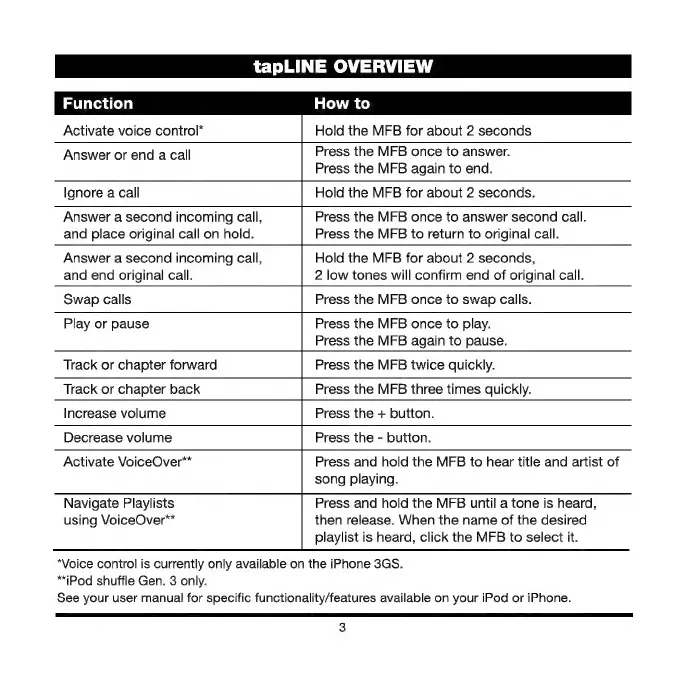
tapLINE
OVERVIEW
Function
How
to
Activate
voice
control*
Hold
the
MFB
for
about
2
seconds
Answer
or
end
a
call
Press
the
MFB
once
to
answer.
Press
the
MFB
again
to
end.
Ignore
a
call
Hold
the
MFB
for
about
2
seconds.
Answer
a
second
incoming
call,
and
place
original
call
on
hold.
Press
the
MFB
once
to
answer
second
call.
Press
the
MFB
to
return
to
original
call.
Answer
a
second
incoming
call,
and end
original
call.
Hold
the
MFB
for
about
2
seconds,
2
low
tones
will
confirm
end
of
original
call.
Swap
calls
Press
the
MFB
once
to
swap
calls.
Play
or
pause
Press
the
MFB
once
to
play.
Press
the
MFB
again
to
pause.
Track
or
chapter
forward
Press
the
MFB
twice
quickly.
Track
or
chapter
back
Press
the
MFB
three
times
quickly.
Increase
volume
Press
the
+
button.
Decrease
volume
Press
the
-
button.
Activate
VoiceOver**
Navigate
Playlists
using
VoiceOver**
Press
and
hold
the
MFB
to
hear
title
and
artist
of
song
playing.
Press
and
hold
the
MFB
until
a
tone
is
heard,
then
release.
When
the
name
of
the
desired
playlist
is
heard,
click
the
MFB
to
select
it.
*Voice
control
is
currently
only
available
on
the
iPhone
3GS.
**iPod
shuffle
Gen.
З
only.
See
your
user
manual
for
specific
functionality/features
available
on
your
iPod
or
iPhone.
3

Other manuals for Scosche IDR655m

Related product manuals