• •
•
•
MAGICPLATE
™
MOUNTING OPTION 3 (Continued)
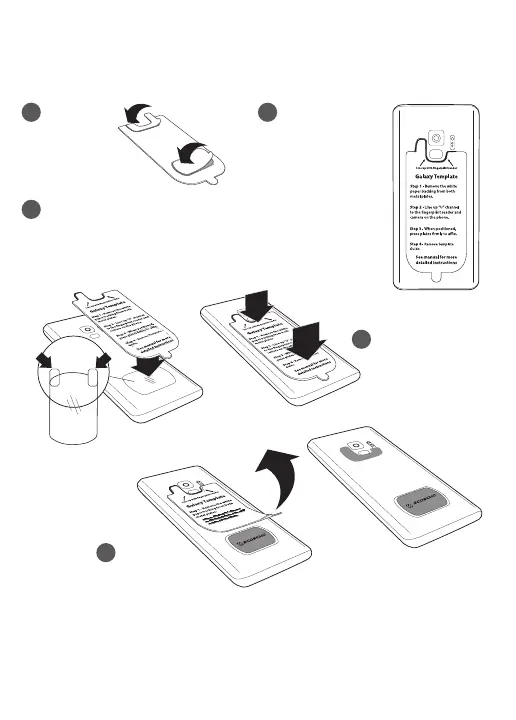
NOTE: For mounting directly* to Galaxy S9/S9+, use the (2) small plates with the
integrated template guide for Galaxy as shown. *For mounting directly to
device only. Do not mount to case.
1
Remove the
2
Line up “U”
white paper
channel to the
backing from
fingerprint reader
both plates.
and camera
on the phone.
3
Remove the backing from the protective film as shown on the
removal tabs (A), and place between the device and the lower
plate (B). The protective film must be used when applying
MAGICPLATETM directly to the back of device.
4
When positioned,
press plates firmly
AB
to affix.
5
Remove
template guide.
REMOVING THE METAL PLATE
Use a thin plastic card to carefully lift the plate’s adhesive surface from the mounting
surface. Slowly lift up and remove the plate.
Do not use any heat or liquids to remove the plate, due to risk of damaging your
phone. Contact Scosche Customer Service for any additional assistance at
800.363.4490 Ext. 1 or customerservice@scosche.com


 To Next Page