EasyManua.ls Logo

Scosche MZ2351B - User Manual

Scosche MZ2351B
2 pages
Print Icon
To Next Page IconTo Next Page
Loading...
4
Step 8
Slide the metal support sleeve into the
radio opening and fasten with locking
tabs. (Right Photo)
Connect all wiring harnesses and slide
in the Double DIN stereo until it locks
into place. (Right Photo)
Snap-in the double DIN trim ring.
Step 9
Step 10
Step 11
Place the kit panel in
the dash opening.
INSTALLATION GUIDE
MZ2351B
IN-DASH INSTALLATION KIT FOR
2005-12 MERCEDES BENZ SL CLASS VEHICLES
This premium installation kit is for 2005-12 Mercedes Benz SL Class vehicles with base model radio (dash modication
required). Included are all the parts you need to mount your car stereo or CD player into your vehicle’s dash. Refer to
individual instruction in this manual to remove your vehicles factory radio and assemble the kit.
PRT (Panel Removal Tool)
Screwdriver
MZ2351B 01/16MZ2351B 01/16
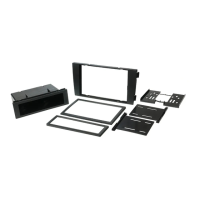
KIT CONTENTS VWA3BTool Required
1. Metal support sleeves
2. Brackets
3. Kit panel
4. Double Din Trim Ring
Antenna Adapter
(Sold Separately)
Question and Answer IconNeed help?

Do you have a question about the Scosche MZ2351B and is the answer not in the manual?

Summary

Installation Guide Overview

Tools and Kit Contents

Lists required tools and contents of the installation kit, including panel removal tool and mounting hardware.

Preliminary Installation Notes

Provides preliminary information, including cautions about disconnecting the battery, using a voltmeter, and avoiding airbag wiring.

Step 8: Place Kit Panel

Place the kit panel into the dash opening.

Step 9: Install Support Sleeve

Slide the metal support sleeve into the radio opening and fasten with locking tabs.

Step 10: Connect Wiring and Stereo

Connect all wiring harnesses and slide the Double DIN stereo in until it locks.

Step 11: Snap Trim Ring

Snap-in the double DIN trim ring.

Disassembly Procedure

Step 1: Remove Side Trim Panels

Use a panel removal tool to carefully pop out and remove the side trim panels of the center console.

Step 2: Remove Console Screws

Use a T20 Torx driver to remove screws from the console sides and armrest storage.

Step 3: Remove Front Trim Pieces

Use a screwdriver or pick tool to unsnap and remove rectangular front trim pieces from cup holders.

Kit Assembly Procedure

Step 4: Unsnap Shifter Trim

Use a PRT to carefully unsnap the shifter trim.

Step 5: Remove Center Console Wood Trim

Lift the center console wood trim out, unplug, and remove it.

Step 6: Remove Cup Holder Screws

Extract Torx screws from each outer side of the cup holders.

Step 7: Remove OEM Radio

Carefully slide out the OEM radio from the dash cavity.

Important Information and Disclaimer

Important Contact Information

Provides toll-free technical help line for assistance or replacement parts.

Liability Disclaimer

States Scosche Industries is not responsible for discrepancies or damage during installation.

Summary

Installation Guide Overview

Tools and Kit Contents

Lists required tools and contents of the installation kit, including panel removal tool and mounting hardware.

Preliminary Installation Notes

Provides preliminary information, including cautions about disconnecting the battery, using a voltmeter, and avoiding airbag wiring.

Step 8: Place Kit Panel

Place the kit panel into the dash opening.

Step 9: Install Support Sleeve

Slide the metal support sleeve into the radio opening and fasten with locking tabs.

Step 10: Connect Wiring and Stereo

Connect all wiring harnesses and slide the Double DIN stereo in until it locks.

Step 11: Snap Trim Ring

Snap-in the double DIN trim ring.

Disassembly Procedure

Step 1: Remove Side Trim Panels

Use a panel removal tool to carefully pop out and remove the side trim panels of the center console.

Step 2: Remove Console Screws

Use a T20 Torx driver to remove screws from the console sides and armrest storage.

Step 3: Remove Front Trim Pieces

Use a screwdriver or pick tool to unsnap and remove rectangular front trim pieces from cup holders.

Kit Assembly Procedure

Step 4: Unsnap Shifter Trim

Use a PRT to carefully unsnap the shifter trim.

Step 5: Remove Center Console Wood Trim

Lift the center console wood trim out, unplug, and remove it.

Step 6: Remove Cup Holder Screws

Extract Torx screws from each outer side of the cup holders.

Step 7: Remove OEM Radio

Carefully slide out the OEM radio from the dash cavity.

Important Information and Disclaimer

Important Contact Information

Provides toll-free technical help line for assistance or replacement parts.

Liability Disclaimer

States Scosche Industries is not responsible for discrepancies or damage during installation.

Scosche MZ2351B Specifications

General IconGeneral
DIN SizeDouble DIN
ColorBlack
MaterialPlastic
BrandScosche
ModelMZ2351B
CategoryCar Receiver

Related product manuals