PSM31000
PHONE HOLDER BASE CLAMP
Pre-assembled, initial setup not required for PSM31000.
Please use the following as a guide for rotation/disassembly if
needed.
PHONE CASE ADAPTER SETUP GUIDE
1
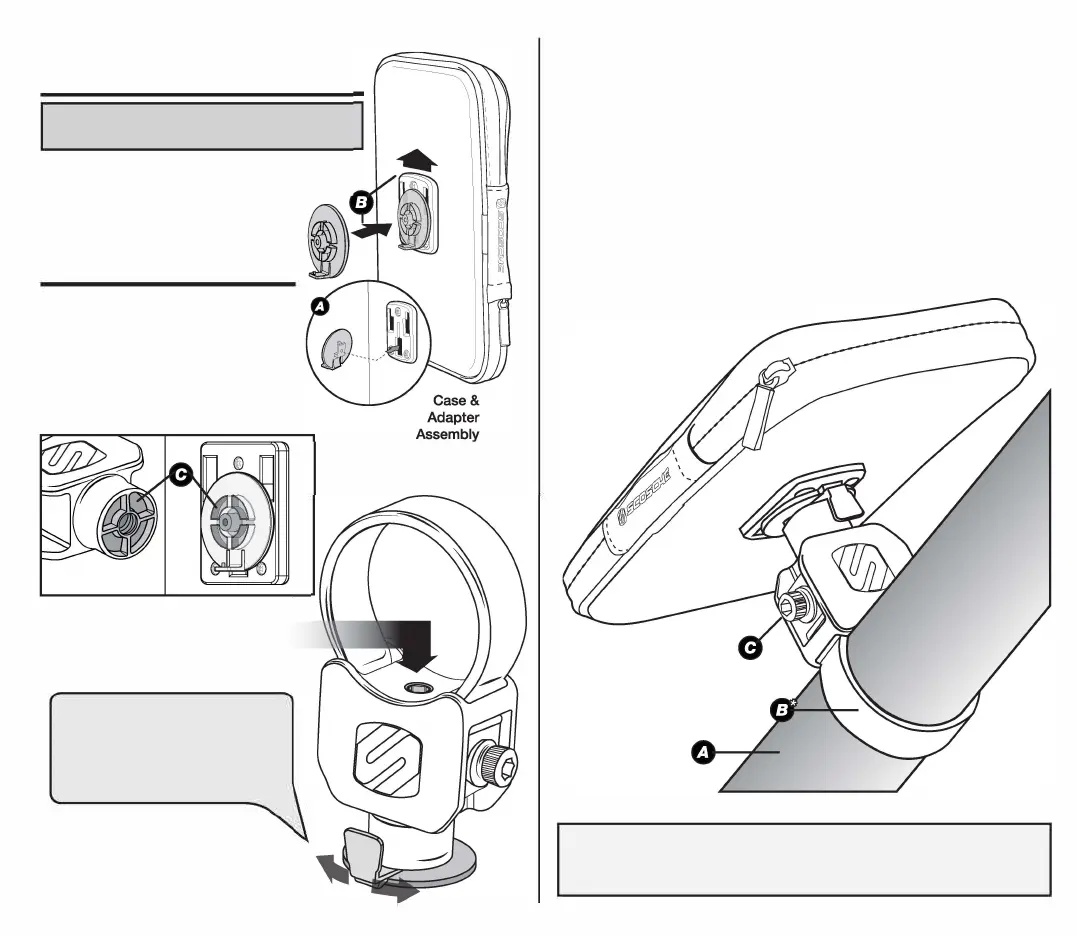
. Align backside of the case adapter
to the
backside of the case and insert into
lower slot (AJ.
2.
Once inserted
into slot
firmly slide
upwards to lock into place (BJ.
MOUNTING THE CASE
ASSEMBLY TO BASE
1. Align front side (base mounting side)
of the case adapter to the bottom
of the base (CJ.
2. Use a 3/16" hex key to fasten the
adapter to the case (DJ.
8
Note: Loosen
the 3/16"
screw (D)
to tighten and/or loosen the case
adapter.
Loosen
to
adjust
the
positioning
of
the case and tighten
to secure the case into desired
position.
PSM31000
PHONE HOLDER BASE CLAMP
MOUNTING THE PHONE HOLDER BASE CLAMP
(PSM31000)
STEP 1
Choose a mounting location
(AJ.
STEP2
Mount base to the
appropriate
sized clamp ring
for
the vehicle (B*J.
Note: Do not exceed 200 inch-pounds
STEP3
Position the phone holder base mount by clicking clamp rings into the base.
Then use a 3/16" hex key to
fasten
the screw & nut (CJ included with the ring
clamp*. Continue until clamp
is
tight and does not move.
Note: Do not exceed 200 inch-pounds
• Various ring clamp sizes available (sold separately w/ hardware).
Clamp Removal:
In-order to remove the tube clamp from location, the clamp must first be tightened to allow
base removal. Once tightened, loosen the clamp and carefully squeeze clamp to remove
from the location. Note: Use protective film to help avoid damage to the paint.



 To Previous Page