Checking your Balance
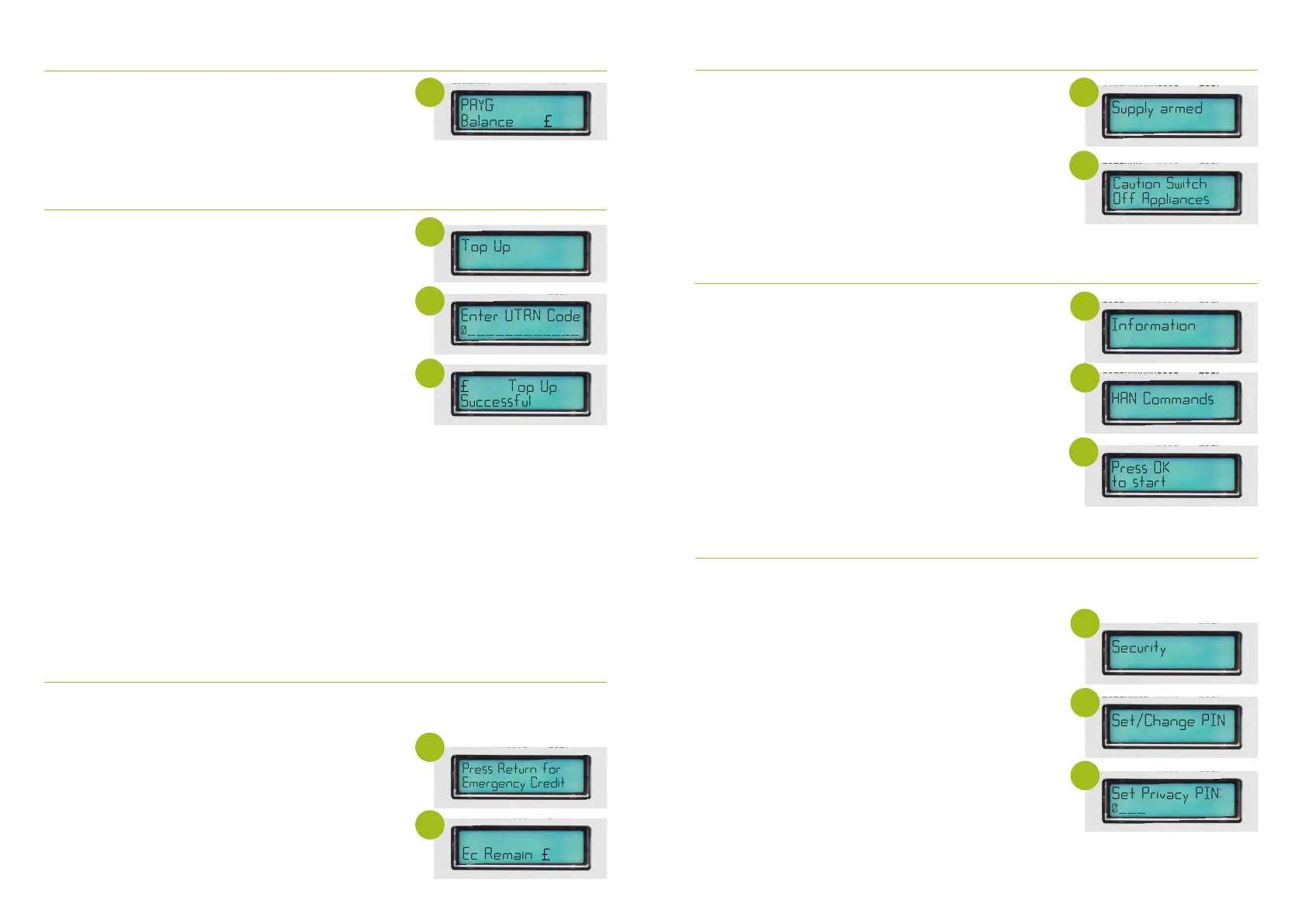
1. Press and hold OK to illuminate the display screen (the
backlight on the meter will only stay on for 5 seconds)
2. The screen will rotate 2 messages,
PAYG balance and consumption
1. Press and hold OK to illuminate main screen
2. The message ‘Press return for Emergency credit’ will
appear along with ‘Low Balance’ which will show the value
of remaining credit on the meter
3. Press and hold return which will activate your emergency
credit
4. The message ‘EC Remain: £5.00’
Accessing your Emergency Credit via your Gas Meter
When your meter credit falls below £1 you will be able to access emergency credit (you can
also do this via your In Home Display)
Activating your emergency credit when your gas supply is o
1. Once the emergency credit has been activated the meter
will show a message ‘Supply Armed’
2. Make sure all your Gas Appliances are o. If there is still gas
going through the meter the message ‘Caution Switch O
Appliances’ will be displayed. There is a safety mechanism
within the meter which if it detects the flow of gas will not
re-enable the supply. All gas appliances must be
disconnected before you can regain your supply.
3. To enable your supply press and hold OK
Refreshing your Gas meter
1. Press and hold OK to illuminate display screen
2. Press and hold OK to enter main menu
3. Press OK button to cycle through menu option until you
reach ‘Information’
4. Press and hold OK once at ‘Information’
5. Press OK to cycle through the options in the ‘Information’
menu until you reach HAN commands
6. Press and hold OK to select HAN commands
7. The message ‘press OK TO START’ will appear
8. Press and hold OK ...the word checking will appear then
PROCESSING (if any updates are pending) then Completed.
9. No further action
Press Return for
Emergency Credit
2.94
Caution Switch
Off Appliances
5.00
4
4
5
2
2
6
Topping up on your meter, using your UTRN code
1. Press and hold OK to illuminate display screen
2. Press and hold OK to access main menu
3. Continue pressing OK until you reach the PREPAY screen
4. Press and hold OK when you reach Prepay Screen and Top
Up screen will show
5. On the top Up option press and hold OK
6. You will be requested to enter your UTRN code
7. To enter your UTRN use the right hand button to select
your digit
8. Press and hold OK to lock in digit and move onto
next digit entry
9. If you make an error press and hold the return button
10. On your last digit entry press and hold the OK button to
submit your UTRN
11. Please wait ‘Applying Top Up’ will be displayed and a
message will appear to confirm ‘UTRN VALIDATED’ or
‘UTRN NOT VALIDATED’ Your UTRN is a 20-digit code which
will appear on your receipt from topping up at a PayZone/
Post Oce outlet or you can view this on the ScottishPower
app. If ‘UTRN NOT VALIDATED’ message is displayed, please
re-enter your 20 digit UTRN ensuring all digits are accurate.
If you continue to see this message please contact us.
3.00
4
6
11
1
1
To set a security PIN on your Gas Meter
1. Press and hold OK to illuminate display screen
2. Press and hold the OK button to access the meter menu
3. Press the OK button to go through main menu options
4. Once you have reached SECURITY hold and press the OK
button
5. SET / CHANGE PIN will show
6. Press and hold OK button and Select Privacy PIN will
appear
7. You will then select your 4 digit pin by using the right or OK
button to navigate through the digits
8. To lock in the digit Press and hold OK
9. Once you have entered your desired PIN press and hold OK
on the last digit to lock in PIN number
10. The message OK to CONFIRM will appear press and hold
OK again to confirm this
11. PIN Stored will appear
This will protect certain information on the meter such as meter balance, debt and tari
information you will be required to enter your PIN each time you want to access these screens.
4
5
6


 To Next Page
 Loading...