EN
For more installation advice, installation and setup videos, Frequently Asked Questions (FAQs), Trouble-
shooting and useful Hints and Tips please visit our online Support Centre
www.scottoiler.com/mybike
Initial setup
f Press and hold the MENU button to manually start the eSystem.
The Driving Screen shows with information required during general usage.
f Press MENU to cycle through the menu options.
Additional Reservoir Menu
f If you have installed no additional reservoir, leave as None.
f If you have a Lube Tube, select.
f If you have an HCR, select.
Reservoir Level Menu
f Fill your reservoir with Scottoiler from the bottle.
f Press SET to set the bar at 100%.
L You need to do this every time you refill the reservoir.
Prime Menu
f Press SET to initiate a 60 second prime cycle. Repeat this step until oil starts dripping from the
spigot on top of the eSystem reservoir. Press SET to stop priming.
f Connect the clear delivery tubing which goes to the sprocket.
f Identify a suitable location for the check valve and repeat PRIME function until oil has reached this
location.
f Cut the delivery tube and insert the check valve.
L The check valve must be inserted into the oil dispenser line for the system to function correctly.
f Repeat the Prime function until oil has reached the dispenser.
f Top up your reservoir with oil using the bottle and spout. Then re-set the Oil Level to 100%. This
will ensure the oil level guage remain accurate.
L You need to manually re-set the Oil Level every time you refill the reservoir.
Calibration Menu
L Ensure your bike is upright and steady and the engine is not running.
f Press SET to calibrate the unit.
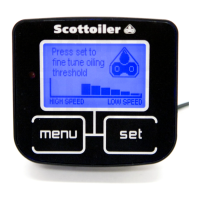
Oiling Threshold Menu
L This is set to 2 as default. It is not necessary to adjust this setting initially, however it may be used
to make the oiler more or less sensitive to acceleration.
Clock Screen Menu
f Press SET to change the time.
f To move to the next digit press for 3 seconds then release.
Driving Screen
f Press SET repeatedly until the flow rate is at your desired level.
L Recommended rate is 60 s/dp.
L For best results clean your chain after fitting the Scottoiler eSystem. Then lightly apply some
Scottoil from the bottle to the chain using a rag or brush. Your eSystem will maintain this film of
oil on the chain.


 To Next Page