OPERATING
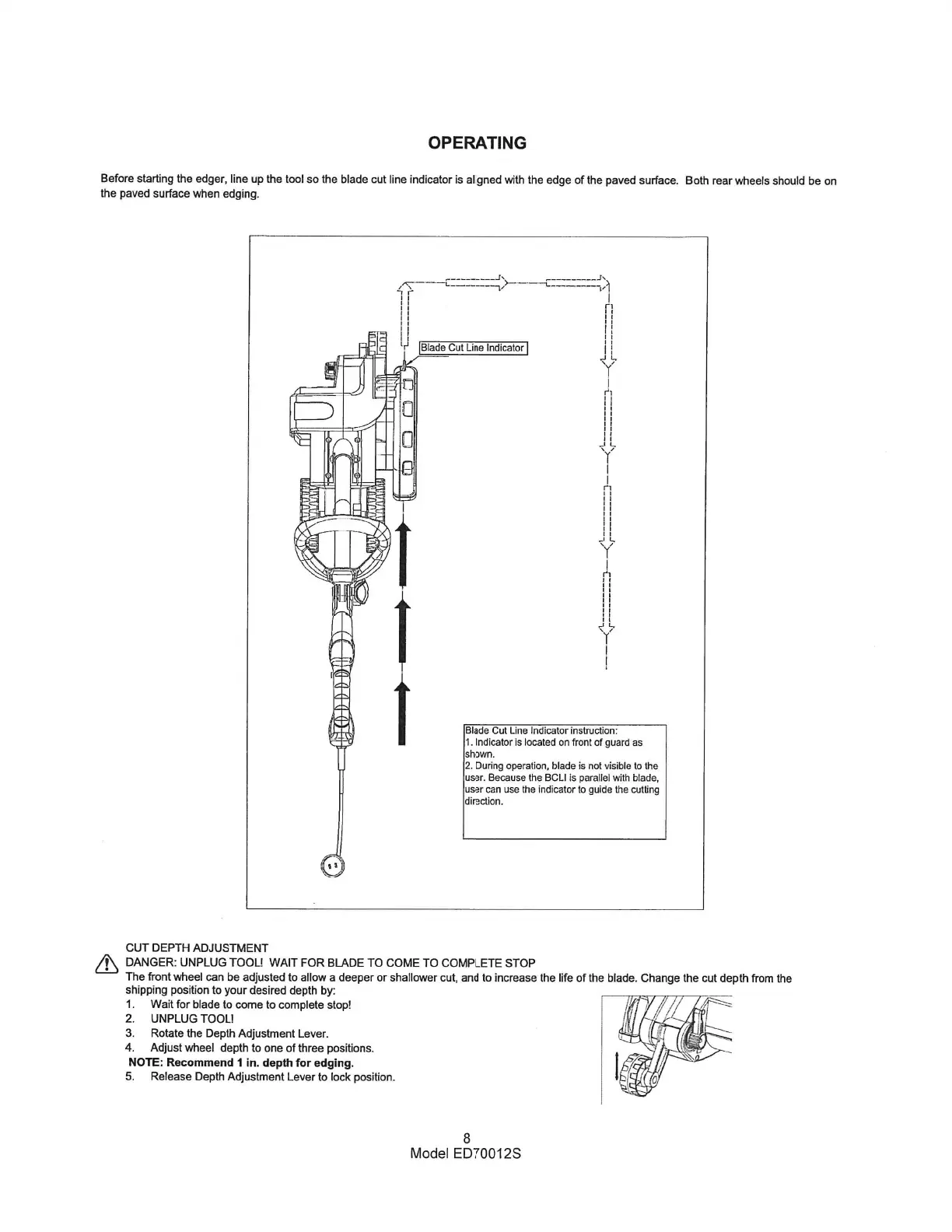
Beforestarting the edger, line up the tool so the blade cut line indicator is aligned with the edge Ofthe pavedsurface. Both rear wheelsshould be on
the pavedsurface when edging.
Blade Cut Line Indicator
Blade Cut Line Indicator instruction:
1. Indicator is located on front of guard as
shown.
2. During operation. blade is not visible to the
user. Because the BCLI is parallel with blade,
user can use the indicator to guide the cutting
direction.
CUT DEPTH ADJUSTMENT
DANGER: UNPLUG TOOL! WAIT FOR BLADE TO COME TO COMPLETE STOP
The frontwheel can be adjusted to allow a deeper or shallower cut. and to increasethe life of the blade. Change the cut depth from the
shippingposition to your desired depth by:
I. Wait for blade to come to complete stop!
2. UNPLUG TOOL!
3. Rotate the Depth Adjustment Lever.
4. Adjust wheel depth to one of three positions.
NOTE: Recommend I in. depth for edging.
5. Release Depth Adjustment Lever to lock position.
8
Model ED70012S



 To Next Page