
 Need help?
Do you have a question about the Scout Guard SG880MK-12mHD and is the answer not in the manual?
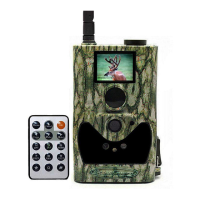
Provides a general overview of the digital scouting camera's features, capabilities, and design.
Details the various input/output interfaces available on the camera body.
Explains the function, type, and maximum range of the infrared wireless remote control.
Describes how to navigate menus and select options using the remote control buttons.
Lists useful characters for inputting data and explains how to access them.
Details the information displayed on the camera's screen when it is turned on.
Explains how the camera sends pictures via MMS/GPRS and the required network service.
Details the types of AA batteries required and how to install them for camera operation.
Provides instructions on inserting the SD and SIM cards correctly into the camera.
Guides users on downloading setup software and configuring camera settings.
Explains how to switch the camera to TEST mode and its associated functions.
Describes how to access and customize camera settings via the remote control.
Explains how to manually capture photos or record videos using the remote.
Details how to send photos via MMS in TEST mode when the Send Mode is set to Manual.
Guides on powering on the camera, entering ON mode, and the buffering time.
Explains how to control the camera via SMS commands and mentions the Android application.
Lists various SMS commands for controlling camera functions and parameters.
Explains how to access the camera's settings menu in TEST mode for customization.
Describes how to view and delete images or videos in playback mode.
Instructions on how to view photos using the remote control in TEST mode.
Details the process for deleting selected photos or videos from the camera.
Explains how to turn on the laser pointer function for aiming and notes safety precautions.
Describes the file naming convention used for images and videos captured by the camera.
 General
| Video Resolution | 1280x720 |
|---|---|
| Detection Range | 65 feet |
| Battery Type | 8 AA batteries |
| Storage | SD Card (up to 32GB) |
| IR-Flash | Yes |
| Picture Resolution | 12MP |
| Video Resolution (Additional) | 640x480 |
| Night Vision | Yes |
| Battery Life | Up to 6 months |
| Image Sensor | 12MP |
| Trigger Speed | 0.3s |
| Flash Type | Infrared |
| PIR Sensitivity | Adjustable |
| Weight | Approximately 300g |
| Operation Temperature | -20°C to 60°C |

 To Next Page