IMPORTANT NOTICE
Though G02SLEEP is based on scientific principles and research on human physiology and
cognition, it is not a medicai device.
Product complies with directive 2014/53/UE.
WHAT’S IN THE BOX?
• GO2SLEEP X1
• Ring Silicon Holden X3
• Charger X1
• USB Cable X1
• User Manual X1
GO2SLEEP
Charger User Manual USB Cable
Ring Silicon Holder - S Ring Silicon Holder - M Ring Silicon Holder - L
GET TO KNOW GOSLEEP
PIN
PIN
SENSOR
STEP 1
Choose a silicon holder
Take out the GO2SLEEP, choose a silicon holder of the right size, and put the GO2SLEEP
into the silicon holder.
STEP 2
Connect the charger to the power source
Connect the charger with the USB cable, then connect them to the power source.
STEP 3
Activate/Charge your G02SLEEP
When using G02SLEEP for the first time, put your G02SLEEP on charge dock as shown in
the picture. As the red led light flashes, the device has been activated successfully and in
the charging state. Once fully charged the red light will turn green.
LED
100%
Charge
PIN
STEP 4
Download SLEEPON APP
Android Device : Search for "SLEEPON" in Google Play. Tap on the SLEEPON icon and
select "Install".
iOS Device: Search for "SLEEPON" in Apple Store. Press "Get" to download.
STEP 5
Connect GO2SLEEP
Open the app and tap Join SLEEPON to be guided through a series of questions that help
you create your SLEEPON account, or login to your existing account. The app will search
for the ring automatically.
After binding successful, the green light turns on and the ring vibrates once which means
the connection is successful.


 To Next Page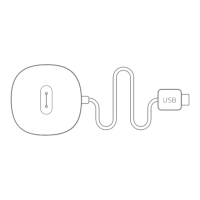


 General