8
SELECTING AN ECO PROGRAMME
You have the choice of 3 programmes that are adapted to dierent room
occupancy schedules. This enables real energy savings without you having
to intervene and without the need for an external programmer.
The programmes are only activated after setting the time. (see § Setting the
time).
IMPORTANT : when the time is not set, programmes remain in Eco
mode.
____________________________________________________________
P1
.
°C
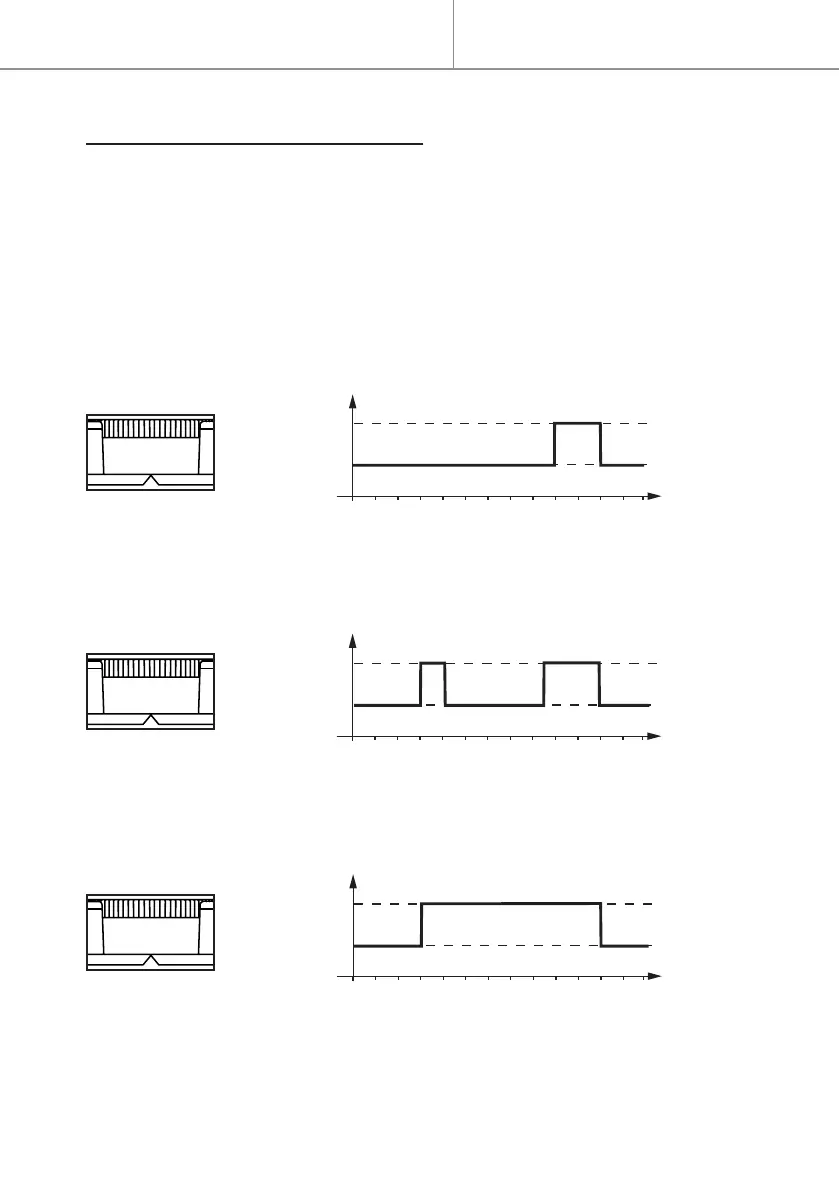
Programme 1 (evening)
0h 2 4 6 8 10 12 14 16 18 20 22 24 2h
Comfort
Eco
- The Comfort mode temperature is programmed automatically in the
evening from 18:00 to 22:00. Outside of this time period, the temperature
automatically switches to economy mode.
____________________________________________________________
P2
.
Comfort
Eco
°C
Programme 2 (morning and evening)
0h 2 4 6 8 10 12 14 16 18 20 22 24 2h
- The Comfort mode temperature is programmed automatically in the morn-
ing from 6:00 to 8:00 and in the evening from 17:00 to 22:00. Outside of
this time period, the temperature automatically switches to economy mode.
____________________________________________________________
P3
.
Comfort
Eco
°C
Programme 3 (morning to evening)
0h 2 4 6 8 10 12 14 16 18 20 22 24 2h
- The Comfort mode temperature is programmed automatically from morn-
ing to evening from 6:00 to 22:00. Outside of this time period, the temper-
ature automatically switches to economy mode.
____________________________________________________________
Quick start


 To Next Page