11) LOOKING AT MANUALLY CAPTURED IMAGES
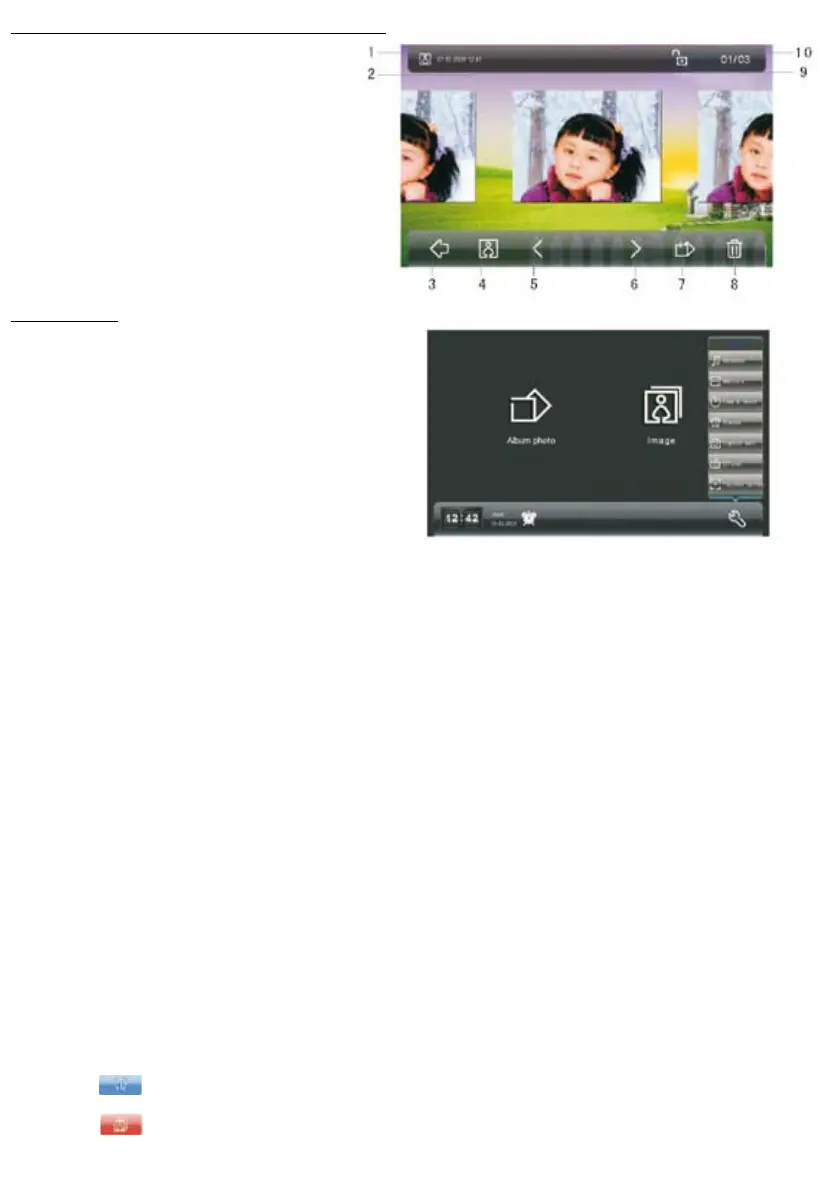
Press image to access the manual capture menu
1 => Manual image capturing indicator
2 => Date of the shot
3 => Back to the home screen
4 => View the captured images automatically
5 => Previous image
6 => Next image
7 => Add the image to the photo album
(Important: The SD card must be tted).
8 => Remove the image
9 => Lock / unlock the removal operation
10 => Organisation (capacity of 45 folders)
12) SETTINGS
Press the key on the home screen
° MELODY SETTINGS
press on melodies
select the melody (choice of 9)
adjust the volume (8 levels)
° MEMORY
Press on memory
view the information
format the monitor’s memory
view the memory of the SD card
° DATE AND TIME
Press date and time. Choose the type of clock: analogue or digital. Programming the date and time
Waiting time: programming the time to return to standby mode
(standard standby mode or photo frame standby mode)
° ALARM
Press alarm. Set the alarm 1:
- Disable / enable
- alarm clock
- alarm ring tone
- Repetition
Set the alarm 2 :
- Disable / enable
- alarm clock
- alarm ring tone
- Repetition
° AUTOMATIC CAPTURE
Press automatic capture. Enable or disable the function.
° CLEANING THE SCREEN
Press on remove. The touch screen locks for 15 seconds to allow you to clean it.
CALIBRATING THE SCREEN
Press the + symbols that appear until the appearance of the next.
° OTHER FEATURES
Alarm clock
When the alarm clock is abled, the pictogram is displayed. To stop or remove the icon press x
Missed call
If a visitor rings and you were not there, the red icon appears. Press the icon to view the automatically captured
image.


 To Next Page