TB-9083 Page 1 of 3
© 2020 DESCO INDUSTRIES INC
Employee Owned
SCS - 926 JR Industrial Drive, Sanford, NC 27332
East: (919) 718-0000 | West: (909) 627-9634 • Website: StaticControl.com
June 2020
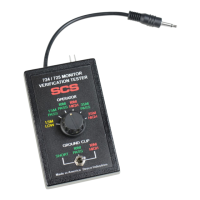
Figure 1. SCS 770065 Verication Tester
Description
The SCS 770065 Verification Tester is used to
perform periodic test limit verification of the SCS 724
Workstation Monitor, 724 Plus Workstation Monitor,
and 725 Portable Wrist Strap Monitor. Verification
may be accomplished without removing the monitor
from its workstation. The Verification Tester is
National Institute of Standards and Technology (NIST)
traceable. Frequency of verification is based on the
critical nature of the ESD susceptible items handled.
SCS recommends annual calibration of workstation
monitors and the Verification Tester. The SCS 770065
Verification Tester meets ANSI/ESD S20.20 and
Compliance Verification ESD TR53.
The SCS 770065 Verification Tester can be used with
the following items:
Item Description
724 Workstation Monitor
724MO Workstation Monitor, No Power Adapter
725 Portable Wrist Strap Monitor
770724 724 Plus Workstation Monitor
Packaging
1 Verification Tester
1 Certificate of Calibration
Operation
724 Workstation Monitor
Testing the Operator Circuits
The operator high test limit and test voltage may be
configured using the switches located on the right-side
of the 724 Workstation Monitor. The test limit may be
set to either 10 megohms or 35 megohms, and the test
voltage may be set to either 9V or 16V. Take note of the
test limit setting before following the instructions listed
below. The test voltage may be set to any position.
Verication Tester
Operation Instructions
Made in the
United States of America
USER GUIDE TB-9083
Figure 2. Operator test limit and test voltage switches
located on the right-side of the 724 Workstation Monitor
The Verification Tester’s ground clip toggle switch is not
used in the verification of the 724 Workstation Monitor. It
may be set to any position.
1. Insert the Verification Tester’s stereo plug into the
monitor’s operator remote jack #1.
Figure 3. Using the Verication Tester with the 724
Workstation Monitor


 To Next Page
 Need help?
 General