8
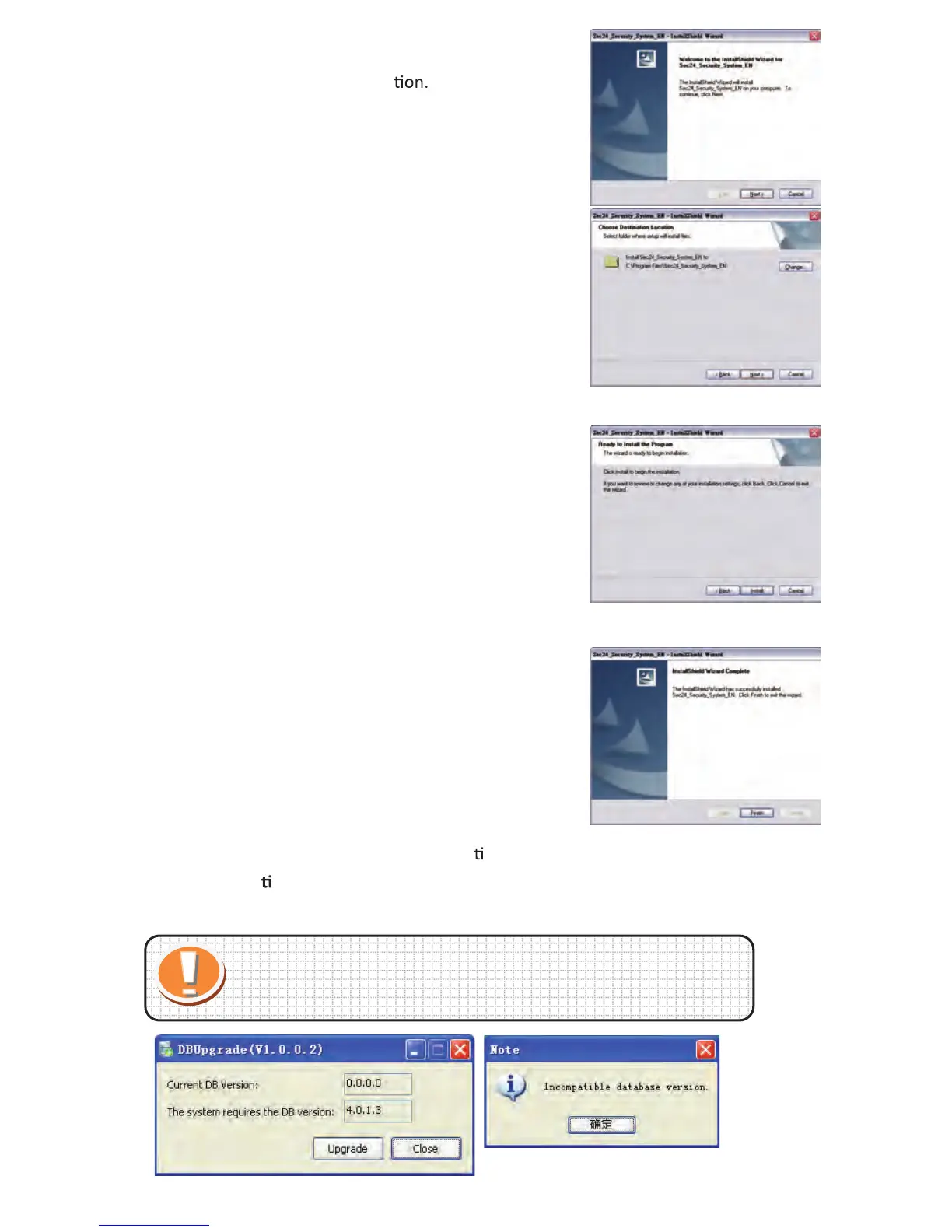
1.1. 1 Click "Next" to start the installa
1.1. 2 Click "Next"
1.1. 3 Click "Install"
1.1. 4 Click "Finish" to complete
Sec24 Security System
installa on.
Run DB Upgrade Tool to check if your applica
on is ready for an upgrade. Click Upgrade if it
prompts "Incompa
ble database version" as figure. Then close DB Upgrade Tool and restart IP
Cam System.
Tips:
Start Menu→ All Programs→ IP Cam System→ DBUpgrade Tool
15
B. Display Se ng
4 Channel
6 Channel 16 Channel
9 Channel
Full Screen Mode:
Double le click mouse of selected channel to switch to full screen mode, double le click
again to switch back.
C. Main func
Search Tool:
Use to set up IP Cam (Local network only)
System
Se ng
History
About IP
Cam
System
Search Tool
System Se ng:
➢ Reconnect IP Cam:
Auto reconnects IP Cam when disconnected.
➢ Alarm Se ng
Sound effects file:
Select your preferable sound when alarming.
➢ Snap shot and video recording path:
Setup save folder for the recorded files and snapshots.
Overwrite video:
Set up the occupy disk space.
➢ Set up the system start status:
video stretch/status bar/confirm when system close
➢ Stretch Video
Normal Mode
Right click mouse on
selected image
Stretch video



 To Next Page