Model: IP-562M
Contents
What You Get
What You Get
FCC/ CE
Knowing the Camera
Camera Installation
Product Specification
1
2
3
3
6
Software Installation
7
1
(1) IP Camera
(2) Power adaptor
(3) Camera stand
(4) Network cable
(5) Screws
(6) Software CD
(7) Manual
22
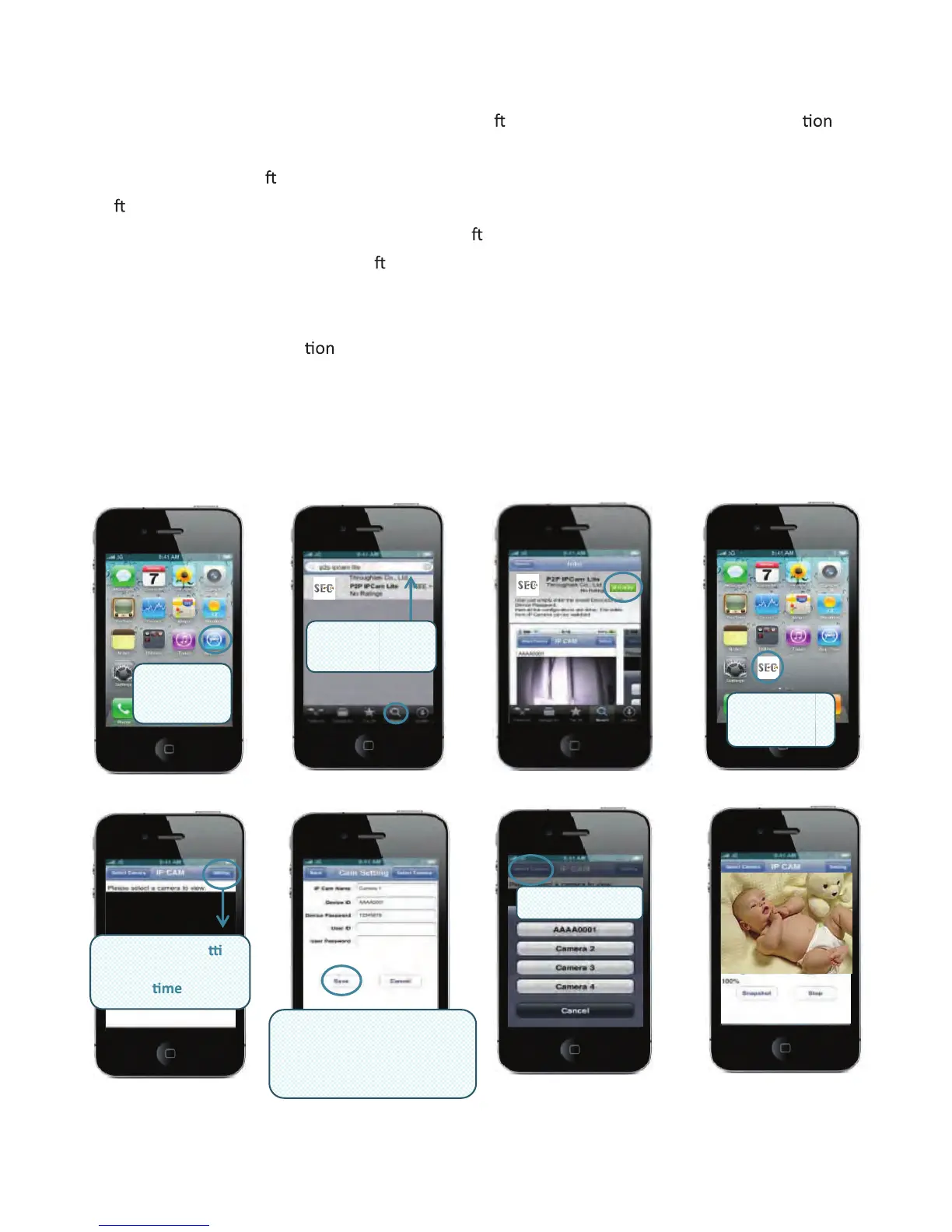
3. IP Cam Mobile
Please download the dedicated video monitoring so ware for Apple OS4 and Android opera
system.
For iPhone, make a so
ware search from APP store and look for “ MySec24 Lite ” then install the
so
ware to the phone accordingly.
For smart phone with Android system, make a so
ware search from Android Market and look for
“ MySec24 Lite ” , then install the so
ware to the phone accordingly.
Please refer to the example for iPhone Android phone below and refer to the user’s manual of
your phone for
more opera
details.
Video monitoring on iPhone
To use the App Store, iPhone must be connected to the Internet.
MySec24 Lite is free; you can download it without charge.
Once you download it, it’s immediately
installed on your iPhone. Then follow the steps below:
Search for
"MySec24 Lite"
P2P IPCam
Launch
App Store
Lanch
"MySec24 Lite"
Select a Camera
Launch Select se ng
to set u IP am info
for first
p C
Your device ID/Password
(Ex. AAAA0001/12345678)
User ID/Password (Set on
Search Tool)



 To Next Page