Need help?
Do you have a question about the SCT 9600 and is the answer not in the manual?
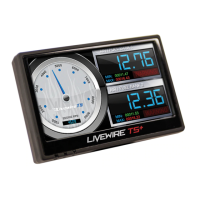
With 128MB of total memory, Livewire is capable of storing multiple tunes for up to 20 vehicle applications.
Livewire's screen displays 6 different vehicle parameters in real-time, including RPM directly from the PCM.
Features include the ability to read, reset, and clear diagnostic trouble codes, bridging gaps with dealer service departments.
Includes a programmable LED shift light that reads RPM directly from the PCM for accuracy and consistency.
Information on upgrading to the Pro Racer Package for total control over all PCM parameters.
Details on SCT support options, including a support forum and contact information.
Information on accessing download areas for free software, device updates, and firmware.
Lists vehicles for which the Livewire Part Number 9600 is pre-programmed and available tune types.
Explains that the Livewire locks to a specific vehicle and must be returned to stock before tuning another.
Pre-programmed files are for minor modifications; aftermarket superchargers/turbochargers require custom tuning.
Consumer action required: Register the device within 30 days of purchase to validate the 1-year limited warranty.
Covers defects for one year from purchase date, provided registration is completed within 30 days.
Excludes damage from abuse, misuse, neglect, accident, acts of God, and improper installation.
Service is obtained by completing online registration or contacting SCT for claim instructions.
The OBD-II cable interfaces Livewire with the vehicle PCM for programming, data logging, and real-time viewing.
The Mini-USB cable connects Livewire to a Windows-based PC for data logging, updates, and file viewing.
The analog port accepts 0-5 volt signals from common sensors; requires separately purchased analog cables.
Ensure all accessories and high draw circuits are OFF before programming and the ignition key is in the OFF position.
Never use the Livewire device while driving; have a passenger assist with data logging.
SCT does not recommend using the device with other tuning modules that increase horsepower or torque.
Return the vehicle to stock configuration before taking it to a dealer service department.
Diesel-powered Ford Excursion owners may need to reset the PATS system before tuning.
Critical procedure for 1999-2005 Diesel Ford Excursions to reset the PATS system before tuning.
All aftermarket chips must be removed from the PCM before starting the tuning process.
The vehicle engine must not be running during the tuning process to prevent severe damage.
Use the specified octane fuel for the tuning file; failure to do so can result in engine damage.
Datalogging while driving is permitted but requires a second person to monitor the vehicle.
On 1994-1997 vehicles, disconnect the battery cable for 10 seconds to reset the PCM's adaptive memory.
The vehicle must be running to monitor or datalog data through the device.
Explains the main menu structure and how to access different functions using the jog wheel.
Describes how to scroll through menu screens by spinning the jog wheel.
Details the function of the ESC key and the two top select buttons for menu interaction.
Adjusts screen brightness and contrast, and allows control over Power LED and Low Power Blinking LED.
Enables or disables the Power LED and the Low Power LED Blinking option via menu selection.
Guide to downloading and installing SCT's Live Link Data logging software from the SCT website.
Steps to install USB drivers for the PC to recognize the Livewire device for data transfer.
Used for general performance increase, more conservative than performance files, offering significant power gain.
Most aggressive file for street driving and racing, potentially offering better fuel economy but higher EGTs.
Used for towing loads, providing more power than stock but less than other files to prevent breakage.
Acts as an exhaust brake to increase engine braking while coasting, helping lower brake temperatures.
Keeps the torque converter clutch locked while coasting, aiding in engine braking, ideal for smaller loads.
Provides a more aggressive shift schedule, keeping the engine in its power band longer while towing.
Useful for drag racing, transferring more usable power and aiding engine braking.
Raises the MPH at which the transmission shifts, bringing it closer to its power band.
Increases the firmness of the transmission shifts.
Adjusts the speed in MPH for shifting at wide open throttle (WOT).
Adjusts transmission fluid pressure firmness for shifts at wide open throttle (WOT).
Allows programming using pre-loaded or custom flash tuning files and adjusting user-adjustable options.
Step-by-step guide for flashing the vehicle with pre-loaded tuning files.
Lists user-adjustable options available for 2003-2004 Mach 1 vehicles.
Lists user-adjustable options available for 2005-2007 Mustang vehicles.
Lists user-adjustable options available for 2003-2004 Marauder vehicles.
Lists user-adjustable options available for 1999-2004 Focus Zetec/SVT vehicles.
Provides notes on option usage, error messages, and cautions for specific vehicle types.
Detailed steps for flashing the vehicle with pre-loaded files, including uploading stock and downloading tunes.
Explains that different vehicles have different available options for customization.
Lists available user-adjustable options for 6.0L Diesel trucks.
Lists available user-adjustable options for 7.3L Diesel trucks.
Lists available user-adjustable options for 4.2L-6.8L F-Series trucks.
Lists available user-adjustable options for Lightning/Harley trucks.
Lists available user-adjustable options for 1994-2004 3.8L Mustang.
Lists available user-adjustable options for 1996-2004 4.6L Mustang.
Lists available user-adjustable options for 1996-2001 Cobra.
Lists available user-adjustable options for 2003-2004 Cobra.
Lists available user-adjustable options for 2000 Cobra R 5.4L.
Explains how to change vehicle parameters like Fuel Octane, Speed/Rev Limiters, and Axle Ratio.
Guide on how to select and set the desired fuel octane level using the adjustment wheel.
Process to program the vehicle with the adjusted User Adjustable Options.
Allows reading and clearing trouble codes to reset the PCM and remove check engine or service lights.
Accesses DTC data functions, including reading codes, clearing codes, and reading vehicle strategy.
Details how to navigate the sub-menu to read vehicle strategy, DTC codes, or clear DTC codes.
Step-by-step instructions to read the vehicle's Diagnostic Trouble Codes (DTCs).
Step-by-step instructions to clear any vehicle Diagnostic Trouble Codes (DTCs).
Sets up two external analog 0-5V signals for data logging or display on the Performance Monitor.
Guides users through selecting channels and setting up external analog devices like MAP sensors.
Details how to configure Channel 1 for various analog inputs such as WideBand or EGT.
Allows setting up the Alert Light feature to illuminate when predefined thresholds are met.
Enables or disables the Alert Light feature, which illuminates under specific monitoring conditions.
Process to select and deselect Parameter IDs (PIDs) for setting up alert triggers.
This menu accesses the data logging feature, used for collecting PCM parameters and analog input data.
Allows viewing instructions, loading parameter files (.dlf), and replaying datalog files (.dat).
Guidance on creating datalog parameter files using Live Link and loading them onto the device.
Displays the device's operating system firmware version.
Shows the revision number of the actual pre-loaded tuning files installed on the device.
Provides the unique serial number assigned to each device, useful for warranty or service.
Shows manufacturer information and the unlock status of the device.
Activates the on-screen monitoring system to display selected PID parameters while the vehicle is running.
Displays selected PID parameters on the monitoring screen, updating as parameters change.
Sub-menu to establish which PCM parameters and data will be displayed on the screen monitor.
Process to select or deselect parameters for display on the Performance Monitor screen.
Accesses the performance calculator to view data like horsepower, torque, and 0-60mph time.
Allows viewing estimated vehicle 1/4 mile times in seconds.
Allows viewing estimated vehicle 0-60 MPH times and adjusting the ending MPH.
Activates and allows setting the RPM for the shift light illumination.
Process to turn the shift light feature on or off after setting the desired RPM.
Calculates estimated power and torque via mathematical computations derived from the PCM.

 To Next Page
 General