Need help?
Do you have a question about the SCT Livewire TS+ and is the answer not in the manual?
Mandatory registration within 30 days for warranty validation.
Instructions for updating device firmware and tune revisions.
Details about the SCT device, including available tunes and VIN locking.
Guides on powering on the Livewire TS+ device using vehicle or computer.
Steps to load custom tune files from email onto the Livewire TS+ device.
Overview of the device's menu structure and navigation options.
Instructions on interacting with the device's touch screen interface.
Process for reading the vehicle's strategy (calibration ID) for custom tuning.
How to read and clear Diagnostic Trouble Codes (DTCs) using the device.
Step-by-step instructions for installing a pre-loaded tune file into the vehicle.
Instructions for loading custom tune files received from a tuning dealer.
Procedure to revert the vehicle's tune back to the original stock configuration.
Explanation of user-adjustable options available within tuning files for customization.
How to use the device for data logging and monitoring vehicle parameters.
Guide for connecting external analog sensors to the device.
Using the device to measure vehicle performance metrics like 0-60 MPH and 1/4 Mile.
Customization options for the device, including screen brightness, theme, and audio.
Answers to frequently asked questions regarding the Livewire TS+ device.
Information on how to contact SCT Performance for support via email or chat.
 General
| Data Logging | Yes |
|---|---|
| Custom Tunes | Yes |
| Cloud Tune Delivery | Yes |
| Built-In WiFi | Yes |
| OBD-II Monitoring | Yes |
| Gauge Display | Yes |
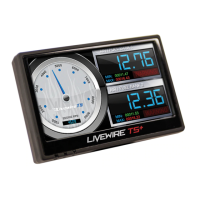
| Display | 4-inch color touchscreen |
| Diagnostics | Read and clear DTCs |
| Vehicle Applications | Ford, GM, Dodge |
| Supported Vehicles | Ford, GM, Dodge |
| Data Monitoring | Real-time |
| Connectivity | WiFi, USB |
| Updates | WiFi updates |
| Warranty | 1 Year |
| Mounting | Suction Cup Mount |

 To Next Page