Need help?
Do you have a question about the Scuf Gaming VANTAGE 2 and is the answer not in the manual?
Welcomes users to the SCUF world and highlights the controller's personalization capabilities.
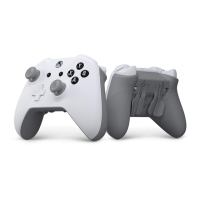
The primary component of the package, the SCUF Vantage 2 controller.
A protective case included for wireless/wired models.
Includes a 10ft Micro-USB cable, SCUF Key, and sticker pack.
Includes long domed thumbsticks and long trigger covers.
Includes a Control Disc and anti-friction rings for customization.
Contains the product guide and manual for the controller.
Details the components and buttons on the front of the controller.
Details the features and ports on the rear of the controller.
Lists and describes the primary functionalities of the SCUF Vantage 2.
Step-by-step guide to pair the controller via Bluetooth.
Instructions for connecting and using the controller in wired mode.
Instructions for connecting and using the controller wirelessly.
Guidance on how to properly charge the SCUF Vantage controller.
Instructions for setting up and using the controller in wired mode.
Explains the paddle system for enhanced gameplay and customization.
Details Sax Button functionality and the Remapping Switch operation.
Overview of trigger optimization features like hair triggers and stops.
Information on removable trigger covers for grip and tuning.
How to swap and customize thumbsticks and anti-friction rings.
How to install and remove the D-pad and control disc.
How to customize the controller's look with a magnetic faceplate.
How to remove vibration modules to reduce controller weight.
How to use the audio touch bar for volume control and muting.
Information about the audio jack for headset compatibility.
Details the location and method to use the reset button.
Description of the protective case accessory.
Description of the USB cable accessory.
Description of the 0.9mm key accessory.
Details the 6-month limited warranty for the product.
How to get technical assistance, warranty, or general support.
Instructions on how to register the controller online.
 General
| Brand | Scuf Gaming |
|---|---|
| Model | VANTAGE 2 |
| Category | Video Game Controller |
| Language | English |


 To Next Page