Need help?
Do you have a question about the Scuf Gaming Prestige and is the answer not in the manual?
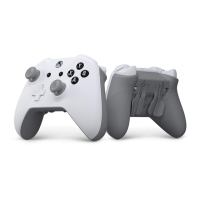
Identifies key buttons, ports, and features on the controller's front and top.
Highlights the rear paddle control system and its components.
Points out adjustable triggers, trigger stops, and grip texture.
Instructions for connecting the controller wirelessly or via USB.
Details the charging process and estimated battery life.
Explains how four rear paddles enhance gameplay by keeping thumbs on thumbsticks.
Details the EMR Mag Key for remapping paddles to controller functions.
Allows fine-tuning of trigger travel for faster response times.
Enables swapping thumbsticks for personalized comfort and control.
Details the 6-month limited warranty for the controller.
Provides phone numbers and website for technical assistance and inquiries.
General warnings and health precautions for controller use.
Warnings regarding cable handling, placement, and damage.
Statements on FCC compliance, wireless device usage, and EU directives.
 General
| Brand | Scuf Gaming |
|---|---|
| Model | Prestige |
| Category | Video Game Controller |
| Language | English |

 To Next Page