SCUF IMPACT
|
3
DIRECTIONS
Controller Set-Up
To set up your SCUF rst turn on your gaming console, then sync controller to
console. Start a game of your choice. Instructions may be found at:
scufgaming.com/instructions
Wired Connectivity through USB
Step 1 To change from a wireless connection to a wired one, turn o the controller
and the PS4 console.
Step 2 Attach the charging cable to the usb socket in the middle of the front of the
controller.
Step 3 Connect the opposite USB side of this cable to one of the USB ports on your
PS4 console, and switch the console back on.
Step 4 Press the SCUF button on the controller when prompted on screen.
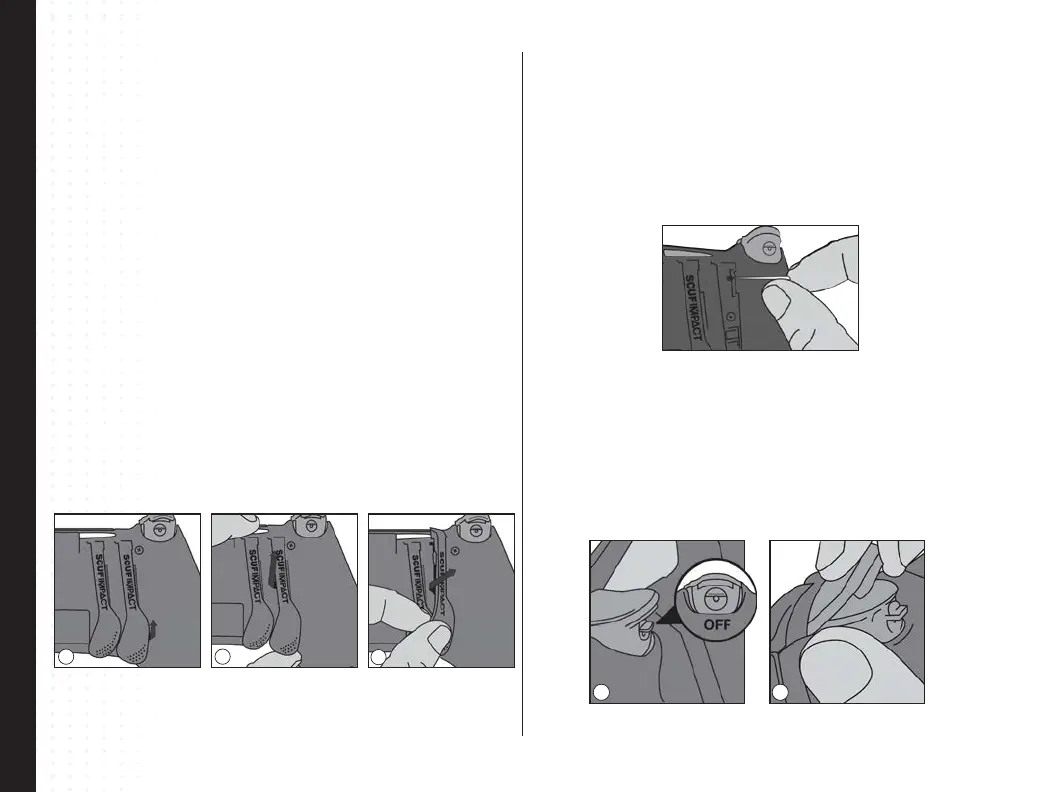
SCUF IMPACT Paddle Removal and Replacement
Step 1 Lift up slightly on the bottom of the paddle to be removed.
Step 2 Push the paddle upwards, and twist slightly out toward the closest handle to
remove the paddle.
Step 3 To replace a paddle, twist the paddle into the paddle cavity from the top. Then
slide to secure into place. You will hear a click when the paddle is secured in place.
1
3
2
SCUF Trigger Covers
Step 1 To remove the trigger cover, push the trigger down on the Quick Shift Trigger
Stop.
Step 2 Lift the bottom of the cover straight up to separate from the trigger
mechanism.
Step 3 To replace the trigger cover, push the trigger down on the Quick Shift Trigger
Stop, then snap the top part of the cover on rst, then tilt the cover down to snap on
the bottom.
Resetting your SCUF IMPACT
Step 1 Turn o the controller.
Step 2 Remove the paddle closest to the L2 shoulder button.
Step 3 Locate the small reset button on the back of the controller near the L2
shoulder button.
Step 3 Use a small, unfolded paper-clip or something similar to push the button; the
button is inside the tiny hole. Hold the button down for a few seconds and release.
211


 To Next Page
 Loading...