EasyManua.ls Logo

Scully 280 Series - Page 12

Default Icon
99 pages
Print Icon
To Next Page IconTo Next Page
To Previous Page IconTo Previous Page
Loading...
OPERA
TI:->G
d. Hewilld - The
lell
blue pushbutton
ewitch
the
maclUM in the Rewtnd
or
Fast
Rc,'crse
mooc.
Fast
Forward
The
right
blue
push-
buttoo switch
operate,
the
machine
in
the
f"ast
Forward
mode.
I.
- The white
illuminated
push-
button
sV,'itCh
discontinues
all
operating
functions
when
dcpressed.
This
button
continues
to
00
illuminated
as
long the
AC
power
switch
is
In
the
ON
position
anol
thus
acts
as
the
tape
transport
pilot light.
.s:.
Start
- A
green
pushbutton switch
which
controistape
motion in
the
play mode a l
so
providcs
power
ncce,sary
for
thc
HECOHD
lunction
.
g.
Capstan
Sp<:ed
Switch -
This
switch
selects
the
or
low spee<lol
the
drive
motor
(normally
a
two
-
speec
motor)
amt
also
selects
the
proper
record
and
playback
equalization
in
the
ampl!liers
.
i.
Edit
- A yellow pushbutton
sw!tch
which,
permits
tape
to
mO"C
in
the
start
mode
without winding onto the takeup
reel.
The
tape
brake
arm
is
also
inoperative.
1,
External
drive
to
capstan
motor
-
A
socket
is
provided
on
the
under
side
of the
relay
<;hassis
to
allowexternai
drive
to the cap_
stan
motor.
This
can
toe
used,
(1)
As
a meanS
01
connecting a
more
ac -
curatc
60
cycle
source
to tile
capstan
motor.
This
rray
be
""sir
e d in
instru-
mentation
type
recording,
and
where
the
local [Xl"'cr
frequency
is
not
reliable
(2)
To
create
speCial
ef(ects,
by
off
speed
playback
Or
recordmg,or
(3)
For
"ynchrnnou$
playback
01
h Im
sound
tracks.
A 150 watt
am?lif
i
er
with
an
output
im_
pedance of
150
ohms
is
suitable
for
driving
the
motor.
(For
intermittent
Operation
,
o
0
a i' e
10
a a a
"
"
"
."
..
.
;;
,
"
....
."
"
'"-
amplifiers
may
De
The mo
tor
circuit
ie
On
1 a n d
8,
pi" 1
is
common
with one
side
o( the
AC
line.)
!I
connections
are
made to
pi
ns O
ther
than and 8 the wiring should
be
checked
for
compatalJility oofo,""
applyi"g
power.
Not mOre
than
I
amp
should
be
drawn
Irom
pin 3. and not
more
than 2
amps
tOl,,]
Irom
1.3
and 7,
Pins
5 and 6 provi<!c
24
volts al 100
rn"
in
the
record
mo;ie.
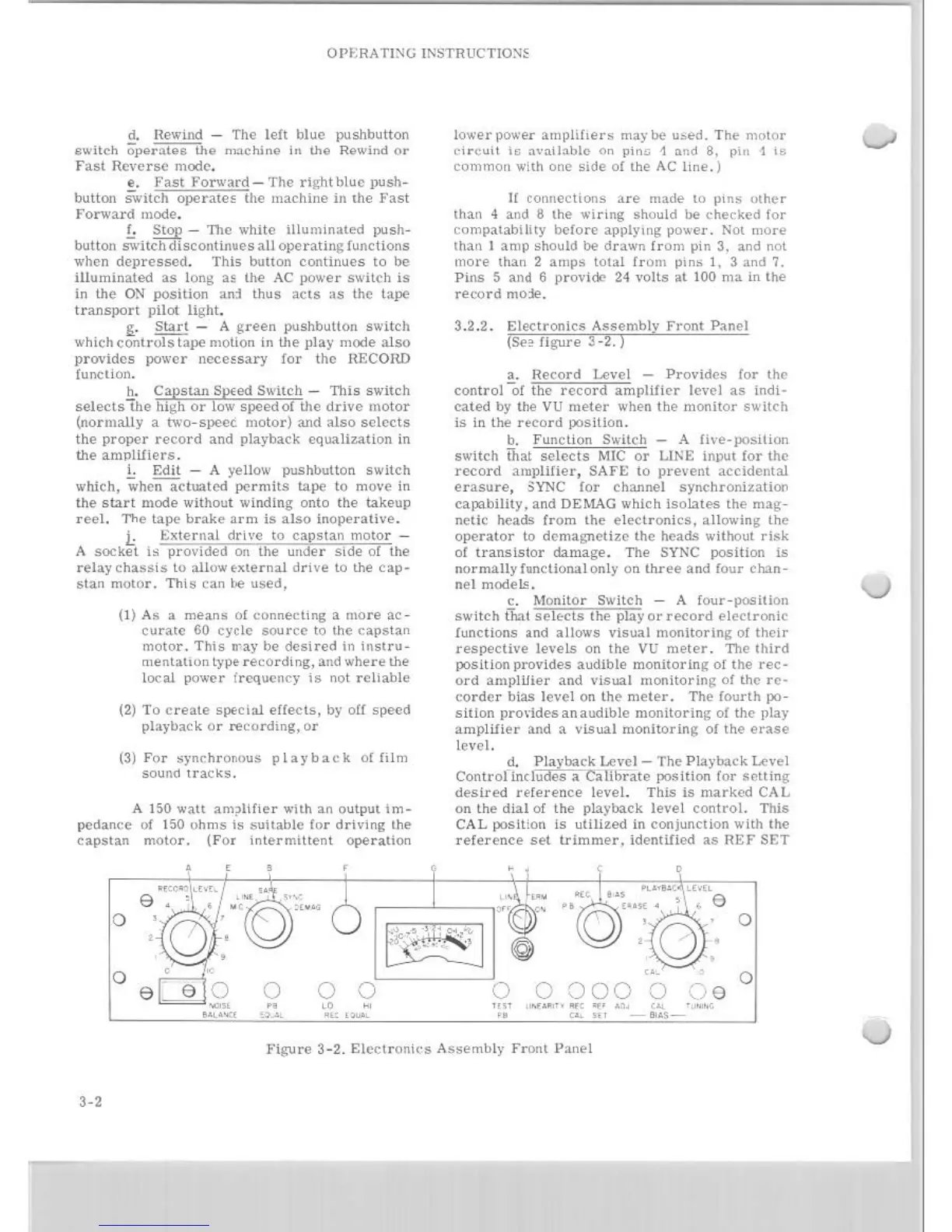
3 .2.2.
Electronics
Assembly
Front
Panel
(See
figure
3 -
2.)
a.
Record
I", ..
el
-
Providcs
for
the
control
of
the
rccord
amplilier
lcvcl
as
indi -
cated
by
the
VU
meter
when
the
monitor
switch
is
in the
record
positlon.
b.
Function
Switch _ A
fh'e-!X'sition
s"'itch
That
selccts
MIC
or
LINE iO)}lltlor thc
record
amplifier,
SAI'£
to
prevent
accidental
erasure,
,YNC
lor
channel
synchronizatioo
cal""billty, and DEMAG which
Isolates
the
mag-
ndic
heads
from
the
e l
ectronics,
allowing
the
operater
to
dcmagnctize
thc "'ithout
risk
of
transistor
damage
. The SYNC position ts
norrnallyfunctionatonly
on
lhree
and
four
chan
-
nel
model!;.
c.
Mon
it
or
Switch - A
four-posltlon
switch
that
the
pliy
Or
record
eleclronic
functions
.nd
allows
visual
monlter!ng
of
their
respective
levels
on
the
VU
mter
. The
third
position
provides
monltor!ng
of
the
rec-
0rd
arnptllier
and
v!sual
mon!torlng
01
thc
re
-
corder
bias
leve
l on
the
meier.
The
fourth
po -
sitton
pro'ides
an
audible
monitoring
01
the
play
amp
li
fier
and a
visual
mooltorlng
01
the
erase
lcvcl.
d.
Playback
uvc
I - The
Playback
Le,'e
I
Controllndudes
a
Calibrate
poSition
lor
sctting
desired
reference
level.
This
is
marked
CAL
on
the
d
ial
of
the
playback
level
control.
This
CAL position
is
utlllzed!n
conjunction with
the
reference
set
trimmer,
Ident!l!e<l
as
HEI' SET
,
.....
.. "
vE
,
, e
" 0 "
o
a a
000
,,-.
o
HI'
;
......
.. "
"'
."
"
"
."
l'igure
3-2.
Electroni<
's
Assembly
Front
Panel