EasyManua.ls Logo

Sea-doo 295100679 - User Manual

Sea-doo 295100679
16 pages
Print Icon
To Next Page IconTo Next Page
Loading...
3/9/2017 einstructiondetails
http://instructions.brp.com/content/instructionsheet/en_CA/einstructiondetails.html#articleNo=kA0a0000000l0rxCAA&lang=en_CA&title=SEADOO%20KIT…
1/16
SEADOOKITDepthFinder
Partnumber(SKU):295100679
Product: SeaDoo_watercraft
Projectno: 487802049
InstructionSheetP/N: 487802049
Revisionno:
Revisiondate:
Itemcovered: DepthFinder(KitP/N:295100679)
PRIORTOINSTALLATION,PLEASEVERIFYIFAREVISEDVERSIONOFTHISINSTRUCTION
SHEETISAVAILABLEONKNOWLEDGECENTER.
Thefollowingsymbolsmaybeusedinthisdocument:
WARNING
Indicatesahazardoussituationwhich,ifnotavoided,couldresultindeathorseriousinjury.
CAUTION:Indicatesahazardsituationwhich,ifnotavoided,couldresultinminoror
moderateinjury.
NOTICE Indicatesaninstructionwhich,ifnotfollowed,couldseverelydamagevehicle
componentsorotherproperty.
WARNING
Forsafetyreasons,thiskitmustbeinstalledbyanauthorizedBRPdealer.
Thiskitisdesignedforspecificapplicablemodelsonly(authorizedBRPdealerswillconfirm
model(s)).Itisnotrecommendedforunitsotherthantheone(those)forwhichitwassold.
ThisinstructionsheetMUSTbegiventothepurchaser.
Shouldremovalofalockingdevice(e.g.locktabs,selflockingfasteners,etc.)berequired
whenundergoingdisassembly/assembly,alwaysreplacewithanewone.
Torquewrenchtighteningspecificationsmustbestrictlyadheredto.
NOTE:Theillustrationsinthisdocumentshowtypicalconstructionofthedifferentassembliesand
maynotreproducethefulldetailorexactshapeoftheparts;however,theyrepresentpartsthathave
thesameorsimilarfunction.
Installationtimeisapproximately1.0hour.
PARTSTOBEINSTALLED
Item Description PartNumber QTY
Question and Answer IconNeed help?

Do you have a question about the Sea-doo 295100679 and is the answer not in the manual?

Summary

Vehicle Preparation

SPARK Models (Type - B)

Instructions for preparing SPARK models of Type - B, including battery disconnection.

GTI, GTS, GTR, WAKE 155 and RXT Models (Type - B or C)

Preparation steps for GTI, GTS, GTR, WAKE 155, and RXT models (Type - B or C), focusing on battery access.

GTX and RXT with Suspension Models (Type - A)

Preparation for GTX and RXT models with suspension (Type - A, 2015 and before), involving rear platform and tray removal.

GTX, RXT and WAKE PRO Models (Type - A)

Preparation for GTX, RXT, WAKE PRO models (Type - A) without suspension, requiring rear access panel removal.

Installation Instructions

Depth Finder Support Installation

Guidance on locating and preparing the area for depth finder support installation, including component removal.

Depth Finder Installation

Steps for installing the gel pad on the depth finder and preparing it for mounting on all models.

Depth Finder Installation (Type - A)

Specific installation steps for Type - A models under the battery (2015 and before), involving battery holder removal.

Depth Finder Installation (Type - B)

Instructions for installing the depth finder with a screwed bracket for Type - B models.

Depth Finder Installation (Type - C)

Steps for installing the depth finder with a glued base for Type - C models.

Electrical Connections

Accessory Fuse Box Preparation

Procedure for preparing the accessory fuse box by disconnecting, removing covers, and removing bus bars.

Wiring Harness Connection to Fuse Box

Details on inserting wire terminals of the wiring harness into the fuse box contact coordinates.

Wiring Harness Routing

Guidance on routing the depth finder wiring harness behind engine mounts in the bottom of the hull.

Electric Connection (Models 2015 and before)

Disconnecting Battery Cables

Instructions to disconnect BLACK (-) battery cable then the RED (+) cable for older models.

Routing Wiring Harness

Steps for routing wiring harness from fuse box to depth finder, securing with locking ties.

Dry Testing of Depth Finder

Test Procedure

Steps to perform a dry test using a container to check depth finder operation and display.

Interpreting Test Results

Guidance on correct gauge readings and troubleshooting air trapped between the depth finder and gel pad.

Reinstallation of Depth Finder

Troubleshooting Air Gaps

Steps to re-seat the depth finder and reapply gel pad if a bad reading indicates an air gap.

Depth Finder Troubleshooting

No Display Issues

Possible causes and remedies for the depth finder displaying nothing in the information center.

Dash Display Issues

Troubleshooting for dash display with blinking sensor, suggesting connection or water issues.

Summary

Vehicle Preparation

SPARK Models (Type - B)

Instructions for preparing SPARK models of Type - B, including battery disconnection.

GTI, GTS, GTR, WAKE 155 and RXT Models (Type - B or C)

Preparation steps for GTI, GTS, GTR, WAKE 155, and RXT models (Type - B or C), focusing on battery access.

GTX and RXT with Suspension Models (Type - A)

Preparation for GTX and RXT models with suspension (Type - A, 2015 and before), involving rear platform and tray removal.

GTX, RXT and WAKE PRO Models (Type - A)

Preparation for GTX, RXT, WAKE PRO models (Type - A) without suspension, requiring rear access panel removal.

Installation Instructions

Depth Finder Support Installation

Guidance on locating and preparing the area for depth finder support installation, including component removal.

Depth Finder Installation

Steps for installing the gel pad on the depth finder and preparing it for mounting on all models.

Depth Finder Installation (Type - A)

Specific installation steps for Type - A models under the battery (2015 and before), involving battery holder removal.

Depth Finder Installation (Type - B)

Instructions for installing the depth finder with a screwed bracket for Type - B models.

Depth Finder Installation (Type - C)

Steps for installing the depth finder with a glued base for Type - C models.

Electrical Connections

Accessory Fuse Box Preparation

Procedure for preparing the accessory fuse box by disconnecting, removing covers, and removing bus bars.

Wiring Harness Connection to Fuse Box

Details on inserting wire terminals of the wiring harness into the fuse box contact coordinates.

Wiring Harness Routing

Guidance on routing the depth finder wiring harness behind engine mounts in the bottom of the hull.

Electric Connection (Models 2015 and before)

Disconnecting Battery Cables

Instructions to disconnect BLACK (-) battery cable then the RED (+) cable for older models.

Routing Wiring Harness

Steps for routing wiring harness from fuse box to depth finder, securing with locking ties.

Dry Testing of Depth Finder

Test Procedure

Steps to perform a dry test using a container to check depth finder operation and display.

Interpreting Test Results

Guidance on correct gauge readings and troubleshooting air trapped between the depth finder and gel pad.

Reinstallation of Depth Finder

Troubleshooting Air Gaps

Steps to re-seat the depth finder and reapply gel pad if a bad reading indicates an air gap.

Depth Finder Troubleshooting

No Display Issues

Possible causes and remedies for the depth finder displaying nothing in the information center.

Dash Display Issues

Troubleshooting for dash display with blinking sensor, suggesting connection or water issues.

Overview

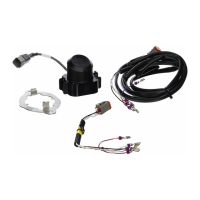
The SEA-DOO KIT - Depth Finder (Part number (SKU): 295100679) is an accessory designed for Sea-Doo watercraft to provide depth measurement functionality. This kit includes all necessary components for installation and operation, ensuring that users can monitor water depth during their rides.

Function Description:

The primary function of this device is to measure and display the water depth beneath the watercraft. It utilizes a depth finder (transducer) that sends and receives sonar signals to determine the distance to the bottom. The depth information is then displayed on the watercraft's multifunction gauge. This allows riders to navigate more safely, especially in unfamiliar or shallow waters, and to identify suitable areas for anchoring or watersports. The system is designed to provide a numerical depth indication when working properly, helping to prevent accidental grounding or damage to the watercraft.

Important Technical Specifications:

  • Part Number (SKU): 295100679
  • Product: Sea-Doo watercraft
  • Project No: 487802049
  • Instruction Sheet P/N: 487802049
  • Item Covered: Depth Finder (Kit P/N: 295100679)
  • Installation Time: Approximately 1.0 hour.
  • Components Included:
    • Depth Finder (P1): 278002954 (Qty: 1) - The main transducer unit.
    • Gel Pad (P2): 293550042 (Qty: 1) - Used to ensure proper contact and prevent air traps between the depth finder and the hull.
    • Depth Finder Support (P3): 278002495 (Qty: 1) - Provides structural support for the depth finder.
    • Depth Finder Base Support (P4): 278001994 (Qty: 1) - The base component for mounting the depth finder.
    • Wiring Harness (P5): 278002571 (Qty: 1) - Connects the depth finder to the watercraft's electrical system and fuse box.
    • 3 Amp Mini Fuse (P6): 710001008 (Qty: 1) - Provides electrical protection for the circuit.
    • M6 x 20 Plastite Hexagonal Screw (P7): 243162060 (Qty: 2) - Fasteners for installation.
    • Locking Tie (P8): 414115200 (Qty: 10) - Used for securing the wiring harness.
  • Tightening Torques:
    • Battery holder screws: 14 ± 2 N•m (124 ± 18 lbf•in)
    • M6 x 20 Plastite Hexagonal Screw (P7): 7 ± 0.5 N•m (62 ± 4 lbf•in)
  • Electrical Connections: The wiring harness connects to specific contact coordinates in the accessory fuse box:
    • Red / White wire: A3
    • Black: D6
    • White / Black: B3
    • White / Red: C3
    • Purple: D5
  • Fuse: A 3 Amp Mini Fuse (P6) is required for the electrical connection.

Usage Features:

The depth finder is designed for integration with the watercraft's existing display system. Once installed, users can access the depth reading by repeatedly pressing the MODE button on the multifunction gauge until "DEPTH" is displayed. The device provides a numerical reading in feet or meters, indicating the current water depth. It is crucial to note that the depth finder is intended as a navigation guide and should not be used as a warning device for riding in shallow water or for obtaining precise navigation data. Its primary role is to assist in general awareness of water depth.

Maintenance Features:

  • Installation Verification: Prior to installation, it is recommended to check the Knowledge Center for any revised versions of the instruction sheet to ensure the most up-to-date procedures are followed.
  • Professional Installation: For safety reasons, the kit must be installed by an authorized BRP dealer. This ensures proper installation and adherence to safety standards.
  • Battery Disconnection: Before any installation or maintenance, the battery cables must be disconnected in a specific order: BLACK (-) cable first, then RED (+) cable. When reconnecting, the order is reversed: RED (+) cable first, then BLACK (-) cable. This is a critical safety measure to prevent electrical hazards.
  • Epoxy Glue Handling: If the installation involves gluing the depth finder base, manufacturers' instructions for mixing and applying epoxy glue must be strictly followed.
  • Dry Testing: After installation, a "dry test" of the depth finder operation is required. This involves placing an empty container (cup, glass, or watercraft security container) directly beneath the depth sounder on the lower hull and energizing the electrical system. The gauge should provide a numerical depth indication.
  • Troubleshooting: The manual provides a troubleshooting guide for common issues:
    • "NOTHING is displayed in the information center":
      • Possible Cause: Depth finder not connected. Remedy: Connect it properly.
      • Possible Cause: 12 V or ground wire open to depth finder. Remedy: Check fuse and wiring harnesses.
      • Possible Cause: Problem with the communication link wires. Remedy: Check WHITE/BLACK and WHITE/RED wires to CAN bus-bars in fuse box.
    • "- - - - (ft or m) is displayed and SENSOR is blinking after self test for 5 seconds":
      • Possible Cause: Watercraft is not in water. Remedy: Launch watercraft in water and recheck.
      • Possible Cause: There is air between gel pad and depth finder or between depth finder and hull. Remedy: Remove depth finder, replace gel pad.
      • Possible Cause: Depth finder is defective. Remedy: Try a new depth finder.
  • Gel Pad Replacement: If the dry test indicates only dashes (no numbers), it suggests air trapped between the depth finder and the gel pad. In this case, the gel pad must be replaced. The reinstallation process involves removing the depth finder and gel pad, thoroughly cleaning the area, and applying a new gel pad to cover the entire mating surface before reinstalling the depth finder.
  • Wiring Harness Management: The wiring harness should be routed behind engine mounts in the bottom of the hull and secured with locking ties every 400 mm (16 inches). It is crucial to keep the harness away from sharp edges and moving, rotating, or hot parts to prevent damage. Any excess wire should be regrouped near the battery and secured.
  • Component Replacement: If removal of locking devices (e.g., lock tabs, self-locking fasteners) is required during disassembly/assembly, they must always be replaced with new ones.
  • Torque Specifications: Torque wrench tightening specifications must be strictly adhered to during installation to ensure components are securely fastened without overtightening or damaging them.

Sea-doo 295100679 Specifications

General IconGeneral
BrandSea-doo
Model295100679
CategoryMarine Equipment
LanguageEnglish