EasyManua.ls Logo

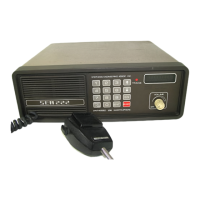
SEA 222 - Dimming the Display

SEA 222
62 pages
Print Icon
To Next Page IconTo Next Page
To Previous Page IconTo Previous Page
Loading...
2.4
PROPAGATION
2.5
2.5.1
2.5.2
2.5.3
2.5.4
Hf
signals
do
propagate
far
beyond
the
horizon.
MF
frequencies
(2-3
MHz)
are
generally
usable
within
300
miles
depending
on
the
time
of
day,
atmospheric
conditions
and
man-made
noise
level.··
The
High
Seas
frequencies
(4,
6,
8,
12,
16,
and
22
MHz)
allow
conmu-
nications
over
thousands
of
miles,
again
subject
to
the
above mentioned
limitations.
Interference
tends
to
be
more
of
a problem
than
on
VHF.
OPERATING
YOUR
SEA
222
HF/SSB
RADIOTELEPHONE
DESCRIPTION
OF
MEMORY
FUNCTIONS
The
SEA
has
TWO
memory
banks.
First,
the
factory
progranmed
frequency
"mask" which
contains
290
frequency
PAIRS,
stored
and
recalled
by
CHANNEL
NUMBER.
Second,
the
internal
11
scratchpad
11
memory
with
al
lows
the
operator
to
program
and
recall
100
frequency
pairs.
See
~
3.4
for
ITU
channel
listing.
(NOTE:
10
of
the
100
field
progranunable channels
are
"EMERGENCY"
channels.)
PUTTING
THE
SEA
222
IN
THE
OPERATING
MODE
Turn
the
Volume
ON/OFF
knob
CLOCKWISE
until
the
radio
is
activated.
When
the
display
indicates
"2182.0",
the
radiotelephone
has
properly
initialized
and
is
set
up
to
operate
on
2182.0
KHz
in
the
A3H
mode.
Wait 3
minutes
for
the
synthesizer
frequency
to
stabilize
and
the
SEA
222
is
ready
to
operate
on
2182.0
KHz.
DIMMING
THE
DISPLAY
Enter
any
desired
SINGLE
digit
number,
followed
by
the
"ENT"
conmand.
The
single
digit
command
will
be
interpreted
by
the
operating
system
as
a
level
of
intensity
with
0
being
display
OFF
and
9 being
maximum
display
brightness.
Note
that
when
the
di
sp
1
ay
is
extinguished,
the
first
stroke
on
ANY
key
will
restore
the
display
to
maximum
brightness.
TURNING
THE
AUDIO
FEEDBACK
OFF/ON
To
turn
off
the
beep,
enter
any even
digit
and
the
"ENT"
keypad.
Example:
Press
"6",
then
"ENT".
To
turn
the
beep back
on
enter
any
odd
di!:jit
and
the
"ENT" keypad. Example: Press
11
6
11
,
then
"ENT".
Note:
this
modification
only
affects
SEA
222's
with
serial
numbers
higher
than
X2724.
SELECTING
A
FREQUENCY
FROM
SCRATCHPAO
MEMORY
Enter
any
desired
TWO
aigit
nun1ber,
followed
by
the
"ENT"
command.
The
two
di
yi
t
command
wi
11
be
interpreted
by
the
operating
system
as
6
I
~··