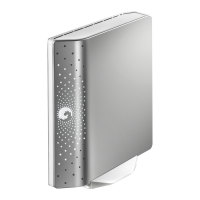
Need help?
Do you have a question about the Seagate FreeAgent Desk 1.5TB and is the answer not in the manual?
Explains how to use the Seagate Status icon to check drive status and access features.
Explains the meaning of drive light flashes for various drive states.
Overview of the main window for managing connected drives and accessing features.
Accesses drive features like power, testing, LED control, and software updates.
How to configure the drive's power-saving mode.
Instructions for running a diagnostic test on the drive's health.
How to check for and install software updates for Seagate Manager.
How to control the drive's LED indicators.
Displays information like volume, capacity, and file system.
Overview of available backup functionalities.
Explains the different types of backup plans available.
Guides on setting up new backup plans.
Steps to create a basic, pre-configured backup plan.
Steps to set up a backup plan with specific folders and file types.
How to use the same backup plan across multiple drives.
Overview of what is displayed in the Backup window.
Instructions to modify existing backup plan settings.
Steps to remove a created backup plan.
Explains how backups run automatically on a set schedule.
How to disable automatic scheduled backups.
Instructions for initiating a backup at any time.
How to access and read the backup history report.
Overview of restoring backed-up files.
Steps to restore a specific older version of a file.
Steps to restore the latest saved version of a file.
Explains how to use Simple Sync for automatic folder synchronization.
Guides on selecting folders and file types for custom synchronization.
Describes how to encrypt synchronized files for security.
Outlines steps to complete the synchronization process on another computer.
Instructions on how to change existing synchronization settings.
How to view the current status and history of synchronization.
Steps to remove existing sync configurations.
Explains the automatic tracking and syncing of file changes.
How to disable automatic file synchronization.
How to manage synchronized files before or during the sync process.
Explains how newer file versions replace older ones.
Steps to create a secure folder for encrypted files.
Overview of managing encryption folders and their contents.
How to modify the password for the encryption folder.
Instructions to remove the encryption folder and its contents.
Steps to access and unlock the encryption folder.
How to remove files and folders from encryption.
How to remove specific items from an encrypted folder.
Steps to unlock a Seagate Secure drive.
How to modify the password for a Seagate Secure drive.
Advice for successfully unlocking the secure drive.
Troubleshooting steps if the drive is not found after unlocking.
Information about forgotten passwords and recovery.
How to set up and use a password hint for recovery.
Where to find the option to set a password hint.
Step-by-step guide to creating a password hint.
How to modify an existing password hint.
Steps to remove a password hint.
How to access the password hint if forgotten.
Steps after erasing the drive to make it usable again.
Guide to manually partitioning and formatting the drive using Windows tools.
 General
| Capacity | 1.5TB |
|---|---|
| Interface | USB 2.0 |
| Rotational Speed | 7200 RPM |
| Compatibility | Windows, Mac |
| Form Factor | 3.5-inch |
| Included Software | Seagate Manager |

 To Next Page