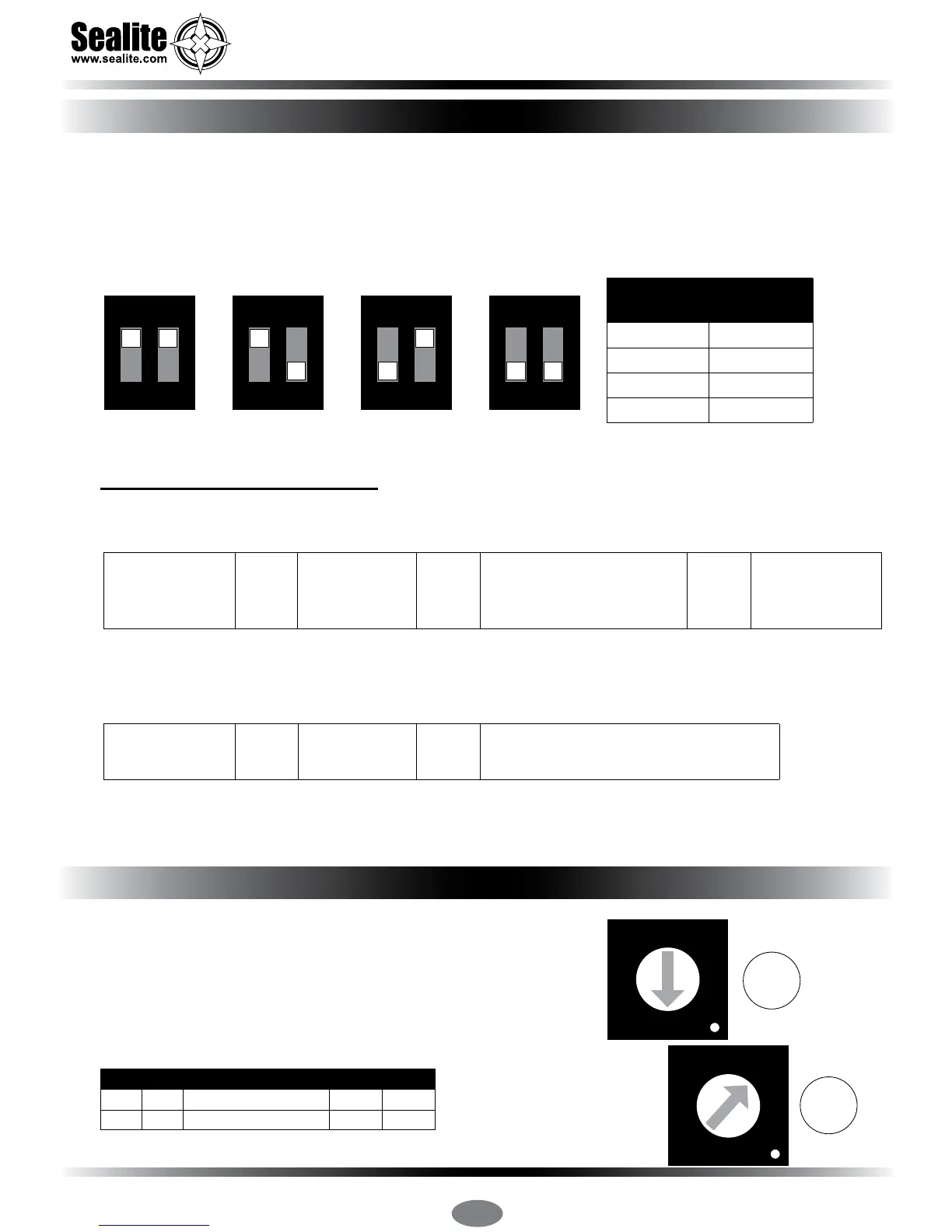
Intensity/power settings on Sealite lanterns operate via DIP switches, located near the rotary switches
on the asher unit. The intensity/power settings may be used to reduce the power consumption and
intensity of the lantern. Setting the lantern to 25% intensity will reduce the power consumption to 25%
of the normal 100% setting and the range by 20% - 40% depending on the maximum intensity. Refer
to Sealite power calculator to conrm reduced range.. This setting may be used to adjust the current
draw of the light to local sunlight conditions.
The following diagrams indicate intensity/power settings:-
Power Consumption Calculator
If the number of Full Sunlight hours is less than 2.5-3.0 hours, please consider reducing the intensity
(Power) or reducing the Duty Cycle.
All lanterns have 2 rotary switches marked A and B on the asher
unit. Turning the small arrows to the appropriate number or letter
will set the code (see ‘Flash Codes’ section, of this manual). The
unit may take up to one minute to activate a new ash code. A
comprehensive list of available ash codes is listed on pages in
the ‘Flash Codes’ section of this manual.
Example:
100%
1 2
ON
75%
1 2
ON
50%
1 2
ON
25%
1 2
ON
Intensity
Setting
Power
mA / hour
100% 85mA
75% 64mA
50% 43mA
25% 22mA
4
5
6
7
8
9
A
B
C
D
E
F
0
1
2
3
4
5
6
7
8
9
A
B
C
D
E
F
0
1
2
3
A
B
SWITCH FLASH CODE ON OFF
A B
A 0 FL 3 S 0.3 2.7
Night Hours
(use 13.7 if
unknown)
Power
mA/hour
Duty Cycle
(e.g. 20% = 0.2)
Total power
used per night
(mA)
X X =
Total power
used per night
(mAh)
Solar Panel
Charge (mA)
Number of full sunlight hours
required to break even
(the amount of time it will take for the solar to
replace what the light took out overnight)
/ 279 =
Selecting an Intensity/Power Setting
Selecting a Flash Code - Rotary Switches A & B



 To Next Page