EasyManua.ls Logo

Sears SILVERTONE 8070 - Page 5

Sears SILVERTONE 8070
12 pages
Print Icon
To Next Page IconTo Next Page
To Previous Page IconTo Previous Page
Loading...
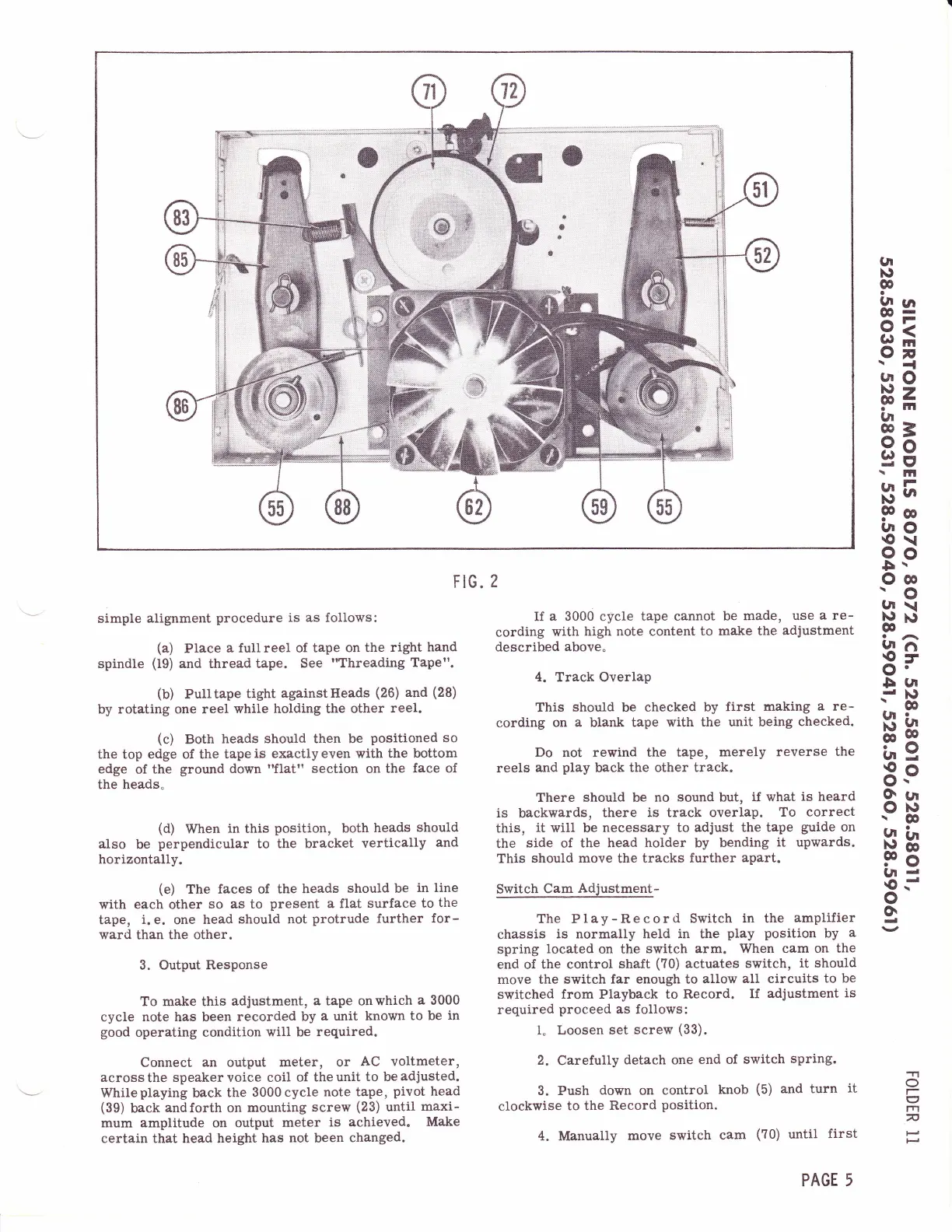
FIG.
2
(Jt
)\'
o
ia
ra
O3
o>
IF
\{
l/|o
}rlz
Pf,
gt
FE
3s
bH
Po
uo
€\
oo
$,r
Oo
'o
gr\
t9xl
o
b?
O'
5(rt
-d
Nt
-o
Hg
ts
6Pn
OP
r$
Atr
F8
gld
€--
o
g
simple
alignment
procedure
is as follows:
(a)
Place
a
full reel
of
tape on
the
right
hand
spindle
(i9)
and thread tape.
See
"Threading
Tape".
(b)
Pulltape
tight
againstHeads
(26)
and
(28)
by rotating one
reel
while holding the
other
reel.
(c)
Both
heads
should then be
positioned
so
the top
edge
of
the
tape
is exactly even with
the bottom
edge
of the
ground down
'Tlat"
section
on
the
face of
the heads"
(d)
When
in
this
position,
both
heads
should
also
be
perpendicular
to the
bracket
vertically
and
horizontally.
(e)
The faces of
the
heads
should be
in line
with
each
other
so as to
present
a flat surface
to
the
tape,
i.
e.
one
head
should not
protrude
further
for-
ward
than the other.
3. Output Response
To make this
adjustment,
a tape onwhich
a
3000
cycle note has been
recorded by
a unit known
to be
in
good
operating
condition
will
be
required.
Connect an output
meter, or
AC voltmeter,
across
the
speaker voice coil
of the
unit
to
be
adjusted.
Whileplaying back the
3000cycle
note tape,
pivot
head
(39)
back
andforth
on
mounting
screw
(23)
until
maxi-
mum amplitude on
output
meter
is
achieved.
Make
certain that
head height
has
not
been
changed.
If
a 3000
cicle
tape cannot
be
made,
use
a
re-
cording
with
high note content
to mal<e
the
adjustment
described
above"
4. Track Overlap
This
should
be checked by
first
making
a re-
cording
on
a
blank
tape
with
the unit being
checked.
Do
not
rewind the tape,
merely
reverse
the
reels
and
play
back
the other
track.
There should be
no sound but,
if what
is
heard
is backwards,
there
is
track
overlap.
To
correct
this,
it
will
be
necessary
to adjust the tape
guide
on
the
side
of the
head holder by bending
it
upwards.
This
should
move
the tracks
further
apart.
Switch
Cam
Adiustqglt-
The Play-Record
Switch
in the
amplifier
chassis
is
normally
held in the
play position
by
a
spring
located
on the
switch
arm. When cam
on
the
end of
the control
shaft
(?0)
actuates
switch,
it should
move the
switch far enough to
allow
all
circuits
to be
switched
from Playback to Record.
If adjustment
is
required
proceed
as follows:
1. Loosen
set
screw
(33).
2.
Carefully
detach one
end of
switch
spring.
3.
Push
down
on
control
knob
(5)
and
turn
it
clockwise
to the
Record
Position.
4. Manually
move
switch cam
(?0)
until
first
o
I
n
PAGE 5