English
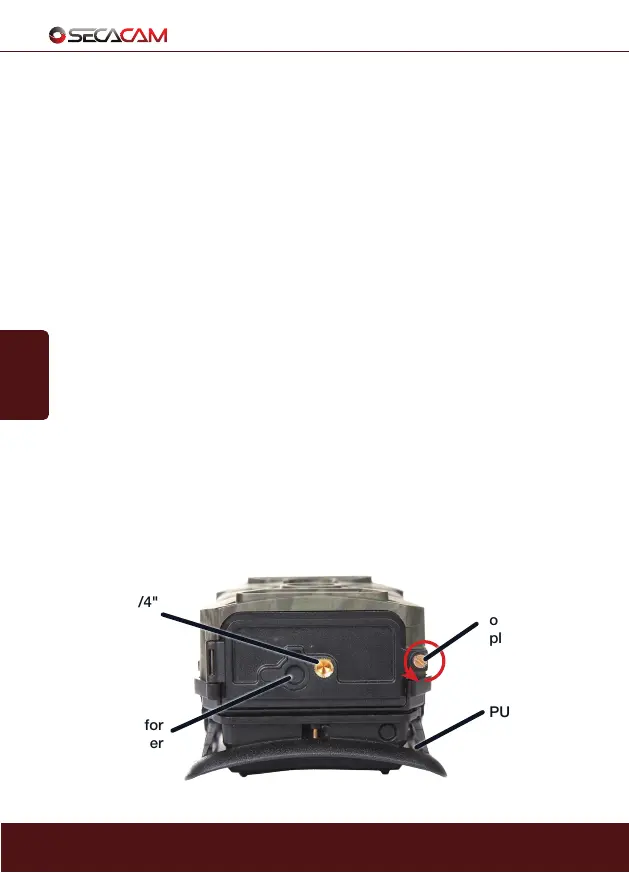
Loosen
screw to
open base
plate
PULL OUT
Tripod socket
1/4"
Socket cover for
external power
supply (optional)
46
LED switch: At night, the SECACAM Raptor Mobile automatically adds the
invisible flash to your photographs. For most uses, where objects are further
away, we advise you to set the LED switch to '56'. Now both the top and
bottom fields of the invisible flash LEDs are used. The SECACAM Raptor
Mobile will adjust the exposure for each individual shot. If your night shots are
too bright, try toggling your SECACAM’s LED function to the '25' position.
Push notification toggle (ON/OFF): Toggle on and off the push notifications
you receive from your SECACAM Raptor Mobile when it snaps a new photo.
Colour LCD display: Turn on the colour LCD display by pressing the OK but-
ton. There you can change your photo settings and view the images already
captured.
Status indicator: The red LED light indicates that the camera has just been
turned on, but is not yet recording. The light will turn off once the camera is
completely activated and functional.
Infrared sensor: The passive infrared sensor (PIR) recognises moving heat
sources and is what triggers the camera. The sensitivity can be set in the
menu.
Shutter speed: A very important feature of your SECACAM Raptor Mobile
is its extremely fast shutter speed of under 0.4 seconds. With this camera,
even fast moving objects, like birds or runners, are captured with sharp quality
before leaving the sights of the camera.
2. Your SECACAM


 To Next Page