English
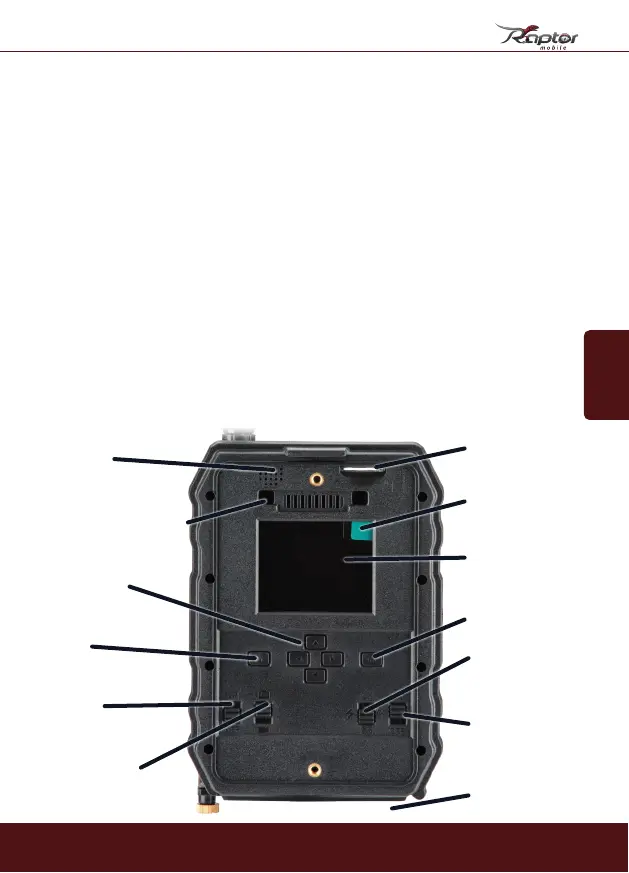
Antennae-socket
Light sensor /
Status indicator
Lens
Infrared sensor
Base plate
locking screw
SIM-card
Remove
protective
covering here
Color-LCD
display
OK
LED-switch
(25 or 56 LEDs)
Push notification
toggle (ON/OFF)
PULL OUT
Speaker
Connection socket
for second battery
compartment
Navigation
Menu
On/Off
No function
(switching Photo to
Video - p.55)
45
1. Contents of box
2. Your SECACAM Raptor mobile
Light sensor: Measures the intensity of lighting. Depending on the lighting
conditions, the camera automatically selects one of three imaging modes:
colour imaging (during daylight), black and white imaging (twilight) or black
and white with flash imaging (night time).
Lens: Your new SECACAM Raptor sports a lens with a diagonal angle of view
of 52° (44mm Full Frame SLR equiv.). The SECACAM Raptor is best suited to
observe smaller areas (like a feeding place or a path). Objects photographed
from the same position are rendered larger than photographed with a wide
angle lens.
Photo/Video switch: This switch has no function. You can switch between
photo and video through the menu (page 55).
ON/OFF switch: In the ‘ON’-position, the camera is ready for use (if equipped
with batteries and a memory card).
Menu: After the LCD display is switched on, press the ‘M’ button to enter
the menu.
2. Your SECACAM


 To Next Page