4
UniSyn Universal Audio to Synth Interface User’s Manual
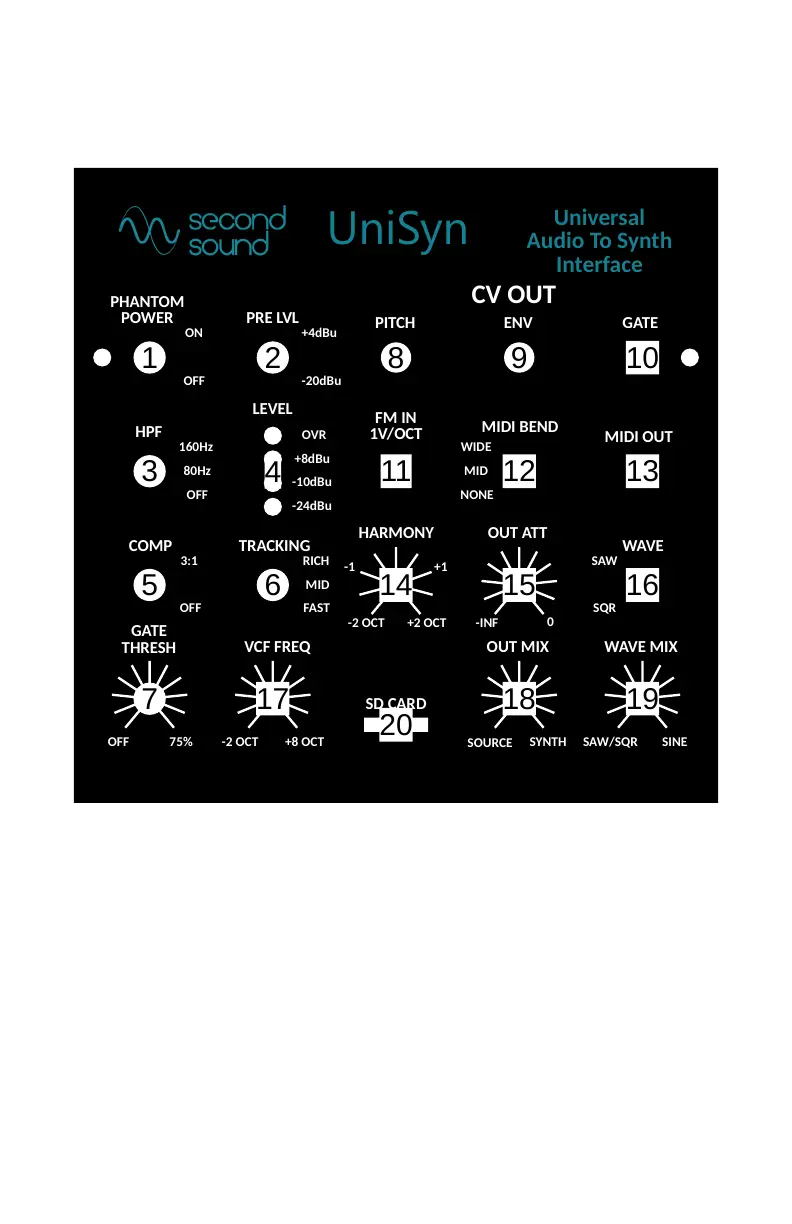
Front Panel of UniSyn
2
11
8 9 10
3 12
16
-2 OCT +8 OCT
GATE
THRESH
HPF
160Hz
80Hz
OFF
PRE LVL
OVR
-24dBu
OUT AT T
SAW/SQR SINE
HARMONY
-2 OCT +2 OCT
PITCH
CV OUT
ENV GATE
SQR
SAW
NONE
WIDE
MID
Universal
Audio To Synth
Interface
MIDI BEND
WAVE
1
TRACKING
RICH
FAST
MID
VCF FREQ
FM IN
1V/OCT
COMP
5
3:1
OFF
WAVE MIX
-INF
0
LEVEL
20
6
PHANTOM
POWER
SOURCE
OUT MIX
SYNTH
-1 +1
UniSyn
13
MIDI OUT
SD CARD
+4dBu
-20dBuOFF
ON
OFF 75%
-10dBu
+8dBu
4
7
14 15
17 18 19
Input Condioning Secon
1. +24v Phantom Power Switch: Adjacent LED lights up when
phantom power is turned on. Be sure to turn o phantom
power when using a ¼” cable as it may degrade performance.
2. Preamp Level Selecon Switch: +4dBu or -20dBu
3. High-Pass Filter Selecon Switch: OFF, 80Hz, or 160Hz. The
high-pass lter follows the preamp and is audible in the
preamp out as well as source/synth mix.


 To Next Page
 Loading...