5
UniSyn Universal Audio to Synth Interface User’s Manual
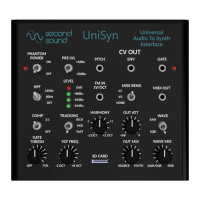
4. 4 LED Level Meter: All three LEDs should be lit at peaks and
top red OVR LED should rarely illuminate, if at all.
5. 3:1 Compression Selecon Switch: Compressor behavior
described in more detail later.
6. Tracking Speed Switch: Use “FAST” for most inputs. Some
very harmonically-rich inputs like bowed violin may exhibit
tracking errors. For such inputs try “MID” or “RICH.”
7. Gate Threshold: Turn clockwise if the UniSyn picks up noise
or if notes sound “glitchy” at the beginning. Turn counter-
clockwise if the UniSyn isn’t picking up note aacks fast
enough.
CV/MIDI Secon
8. Pitch CV: 1v/octave pitch CV output. Output range = 0-8v.
9. Envelope CV: Envelope CV output. Output range = 0-6v.
10. Gate CV: Outputs +5v when note played, 0v otherwise.
Adjacent Red LED is illuminated when gate is OFF.
11. FM CV input: CV input for modulang pitch of the internal
synth voices as well as the CV and MIDI outs. Note that pitch
shi is in discrete semitone steps over a ±2 octave range.
12. MIDI bend: Sets both MIDI bend range and depth of envelope
modulaon of internal VCF. NONE disables MIDI pitch bend
and disables envelope modulaon of VCF; MID enables pitch
bends over ±½ semitone and enables half-range envelope
modulaon of VCF; WIDE enables pitch bends over ±2
semitones and enables full-range envelope modulaon of VCF.
13. MIDI out: ⅛” TRS output, can be converted to 5-pin DIN using
Type B TRS-to-MIDI converter cable (included). MIDI outputs
on Channel 1 (0x0) but this can be changed with an easy
rmware update if desired.


 To Next Page
 Loading...