6
UniSyn Universal Audio to Synth Interface User’s Manual
Internal Synth Secon
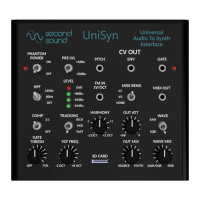
14. Harmony Knob: Adjusts the pitch oset of the internal synth
voices, pitch CV and MIDI notes in semitone steps over a ±2
octave range. The harmony knob posion is summed with the
FM CV input.
15. Output Aenuaon Knob: Master volume for SYNTH OUT
16. Wave Selecon Switch: Toggles internal oscillator wave shape
between sawtooth and square.
17. VCF Frequency Knob: Adjusts maximum cuto frequency of
VCF applied to sawtooth and square waves.
Also controls MIDI envelope modulaon type:
Fully CCW: No envelope modulaon
10 O’Clock: Envelope controls Aertouch (Channel Pressure)
12 O’Clock: Envelope controls Mod Wheel CC
2 O’Clock: Envelope controls Breath Controller CC
Fully CW: Envelope controls Expression CC
18. Source/Synth Mix Knob: Adjusts mix of preamp output with
internal synth voice.
19. Wave Mix Knob: Adjusts mix of post-VCF saw/square wave
with sine wave.
SD Card Slot
20. SD Card Slot: This “future proofs” the UniSyn by making
potenal future rmware updates a piece of cake. All you
need is a micro SD card and an updated binary (to be provided
by Second Sound). You save the binary le to your micro SD
card, insert the card in the slot, and power cycle the UniSyn
(remove and apply power). The four LEDs will light up one at a
me to show that the new rmware is being downloaded, and
you can now enjoy your updated rmware!


 To Next Page
 Loading...