9
UniSyn Universal Audio to Synth Interface User’s Manual
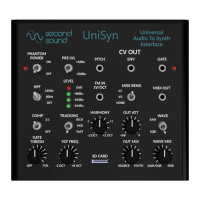
7) Select SAW/SQR waves via the 2-way switch to hear the
dierent waveforms and adjust the WAVE MIX knob to achieve
the desired mix of saw/square + sine waves. Adjust the VCF
FREQ knob to hear its eect on the sawtooth and square waves.
Experiment with the MIDI BEND sengs to observe the eect on
the envelope to VCF modulaon depth.
8) Adjust the TRACKING switch to opmize the frequency tracking
for the audio source chosen. For most cases the FAST seng
works well. There are some instruments with slower aack/decay
and strong harmonics (like bowed strings) which can work beer
with the MID or RICH sengs. As a rule of thumb, if you hear the
UniSyn locking to higher harmonics of the fundamental, try the
MID or RICH seng.
9) Adjust the HARMONY knob to hear the various pitch shi
sengs. Here it is especially useful to mix the dry and wet signals
together so it’s easier to hear what harmony interval is tuned.
Note that the harmony knob is connuous, it does not give you
“clicks” when moving from one harmony to another.
Controlling External Synths Via CV/MIDI
10) Patch the PITCH, GATE and ENV signals out to an analog synth
of your choice and enjoy “playing” that synth with the audio
source of your choice! Note that you can adjust the HARMONY
knob to oset the Pitch CV out in discrete semitone steps over the
enre +/-2v range to accommodate the pitch CV oset of virtually
any analog synth.
11) Connect the MIDI output to the digital synth of your choice
via the included TRS-to-MIDI adapter and a standard MIDI DIN5
cable and enjoy “playing” that synth with the audio source of
your choice. Experiment with the three MIDI BEND opons to
understand how they impact the pitch accuracy and note on/o
behavior using MIDI. Note that the HARMONY knob will pitch
shi the MIDI note so adjust HARMONY to unison if you want
MIDI in unison with your audio input.


 To Next Page
 Loading...